Scientific AI at Scale: Distributed Training
Sam Foreman 2025-09-02
- 👀 Overview
- 📑 Outline
- 🚀 Scaling: Overview
- 🐢 Training on a Single Device
- 🐢 Training on a Single Device
- 🐢 Training on a Single Device
- Training on Multiple GPUs: Data Parallelism
- Data Parallel: Forward Pass
- Data Parallel: Backward Pass
- Data Parallel: Training
- 🗣️ Communication
- AllReduce
- Reduce
- Broadcast
- AllGather
- Scatter
- Why Distributed Training?
- Why Distributed Training? Speedup!
- Dealing with Data
- Broadcast Initial State
- Best Practices
- Going Beyond Data Parallelism
- Going beyond Data Parallelism: DeepSpeed +
ZeRO - Fully Sharded Data Parallel: 🔥 PyTorch +
FSDP - 🕸️ Additional Parallelism Strategies
- Pipeline Parallelism (PP)
- Tensor Parallel (TP)
- Tensor Parallel (TP)
- Tensor (/ Model) Parallel Training: Example
- Tensor (Model) Parallelism
- Tensor Parallelism
- 3D Parallelism
- Deciding on a Parallelism Strategy
- 🦙 Large Language Models
- 🔮 Emergent Abilities
- 🚂 Training LLMs
- ♻️ Life-Cycle of the LLM
- 🎀 Life-Cycle of the LLM
- ⏩ Forward Pass
- 💬 Generating Text
- 👋 Hands On
- 🧑💻 Hands On: Getting Started
- 📦 Install wordplay
-
ezpz: Example [video] - Install
wordplay🎮💬 - Prepare Data
- Launch Training (DDP)
- Training: Example Output
-
wordplay: Example [video] - ❤️ Thank you!
- 📓 References
👀 Overview
- 📊 Slides @
samforeman.me/talks/openskai25/training/slides
- 📄 HTML version: samforeman.me/talks/openskai25/training
📑 Outline
🚀 Scaling: Overview
-
✅ Goal:
- Minimize: Cost (i.e. amount of time spent training)
- Maximize: Performance
📑 Note
See 🤗 Performance and Scalability for more details
🐢 Training on a Single Device
Figure 1: SLOW !! model size limited by GPU memory
🐢 Training on a Single Device
Figure 2: SLOW !! model size limited by GPU memory
🐢 Training on a Single Device
Figure 3: SLOW !! model size limited by GPU memory
Training on Multiple GPUs: Data Parallelism
Figure 4: Each GPU receives unique data at each step
Data Parallel: Forward Pass
Figure 5: Average gradients across all GPUs
Data Parallel: Backward Pass
Figure 6: Send global updates back to each GPU. See: PyTorch / Distributed Data Parallel
Data Parallel: Training
- Each GPU:
- has identical copy of model
- works on a unique subset of data
- Easy to get started (minor modifications to code):
- Requires global communication
- every rank must participate (collective communication) !!
🗣️ Communication
- Need mechanism(s) for communicating across GPUs:
- Collective Communication:
-
Intel oneAPI Collective Communications Library (oneCCL)
⌛ Timeouts
- Collective operations have to be called for each
rankto form a complete collective operation.- Failure to do so will result in other ranks waiting indefinitely
- Collective operations have to be called for each
AllReduce
Perform reductions on data (e.g. sum, min, max) across ranks,
send result back to everyone.
Figure 7: All-Reduce operation: each rank receives the reduction of input values across ranks.
Reduce
- Perform a reduction on data across ranks, send to individual
Figure 8: Reduce operation: one rank receives the reduction of input values across ranks
Broadcast
Figure 9: broadcast (send) a tensor from one rank to
all ranks
AllGather
Figure 10: Gathers tensors from the whole group in a list.
Scatter
Figure 11: Scatters a list of tensors to the whole group
Why Distributed Training?
Nworkers each processing unique batch1 of data:- [
micro_batch_size = 1] [NGPUs] [global_batch_size = N]
- [
- Improved gradient estimators
- Smooth loss landscape
- Less iterations needed for same number of epochs
- common to scale learning rate
lr *= sqrt(N)
- common to scale learning rate
- See: Large Batch Training of Convolutional Networks
Why Distributed Training? Speedup!
Table 1: Recent progress
| Year | Author | GPU | Batch Size | # GPU | TIME (s) | ACC |
|---|---|---|---|---|---|---|
| 2016 | He | P100 | 256 | 8 | 104,400 | 75.30% |
| 2019 | Yamazaki | V100 | 81,920 | 2048 | 72 | 75.08% |
Dealing with Data
- At each training step, we want to ensure that each worker receives unique data
- This can be done in one of two ways:
- Manually partition data (ahead of time)
- Assign unique subsets to each worker
- Each worker can only see their local portion of the data
- Most common approach
- From each worker, randomly select a mini-batch
- Each worker can see the full dataset
- ⚠️ When randomly selecting, it is important that each worker uses different seeds to ensure they receive unique data
- Manually partition data (ahead of time)
Broadcast Initial State
- At the start of training (or when loading from a checkpoint), we want
all of our workers to be initialized consistently
- Broadcast the model and optimizer states from
rank() == 0worker
- Broadcast the model and optimizer states from
Figure 12: To ensure all workers have the same copies, we load on
RANK==0 and broadcast
Best Practices
⏰ Keeping things in Sync
Computation stalls during communication !!
Keeping the communication to computation ratio small is important for effective scaling.
- Use parallel IO whenever possible
- Feed each rank from different files
- Use MPI IO to have each rank read its own batch from a file
- Use several ranks to read data, MPI to scatter to remaining ranks
- Most practical in big at-scale training
- Take advantage of data storage
- Use the right optimizations for Aurora, Polaris, etc.
- Preload data when possible
- Offloading to a GPU frees CPU cycles for loading the next batch of
data
- minimize IO latency this way
- Offloading to a GPU frees CPU cycles for loading the next batch of
data
Going Beyond Data Parallelism
- ✅ Useful when model fits on single GPU:
- ultimately limited by GPU memory
- model performance limited by size
- ⚠️ When model does not fit on a single GPU:
- Offloading (can only get you so far…):
- Otherwise, resort to model parallelism strategies
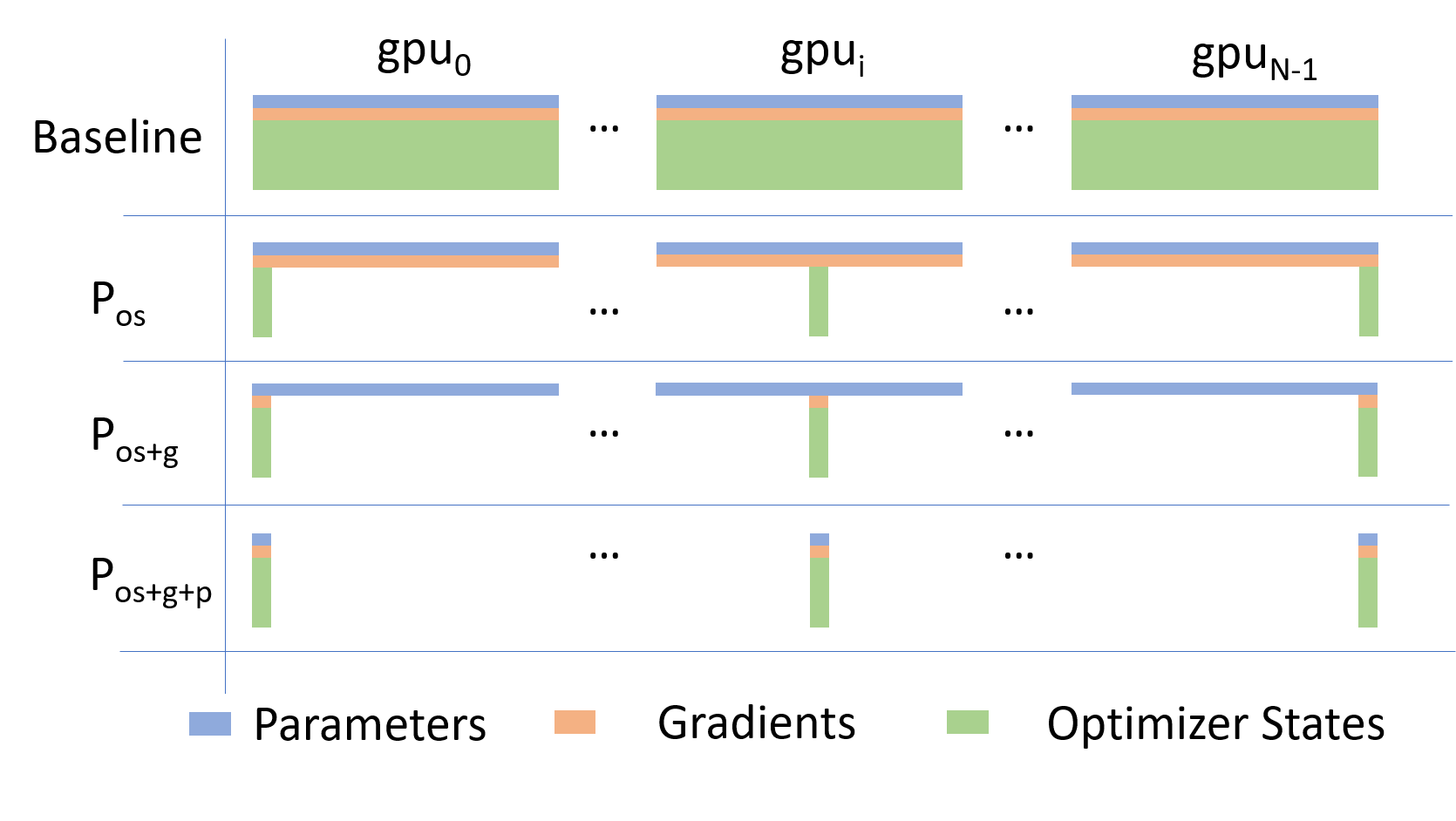
Going beyond Data Parallelism: DeepSpeed + ZeRO
- Depending on the
ZeROstage (1, 2, 3), we can offload:- Stage 1: optimizer states
- Stage 2: gradients + opt. states
- Stage 3: model params + grads + opt. states
Fully Sharded Data Parallel: 🔥 PyTorch + FSDP
- Instead of maintaining per-GPU copy of
{params, grads, opt_states}, FSDP shards (distributes) these across data-parallel workers- can optionally offload the sharded model params to CPU
- Introducing PyTorch Fully Sharded Data Parallel (FSDP) API | PyTorch
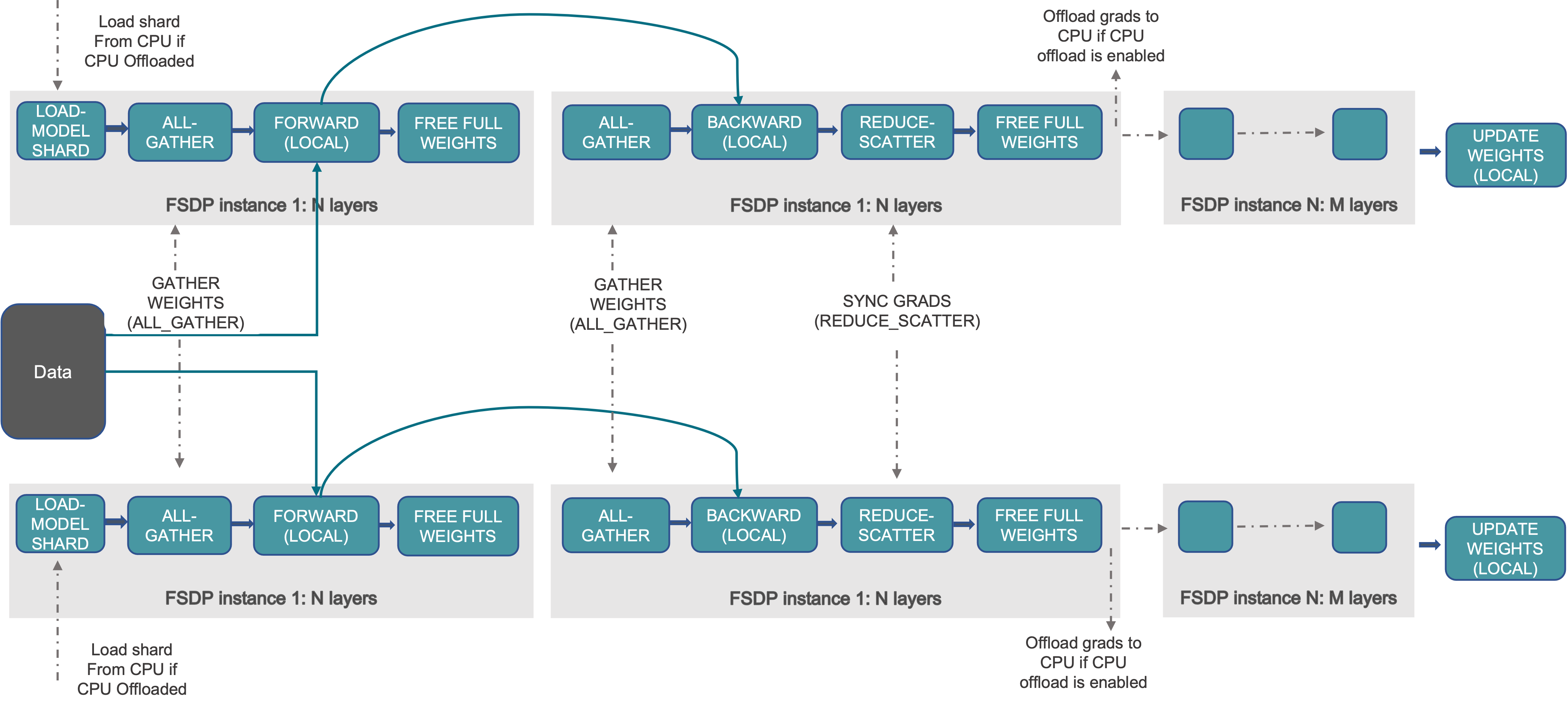
Figure 14: FSDP Workflow. Source
🕸️ Additional Parallelism Strategies
- Tensor (/ Model) Parallelism (
TP): - Pipeline Parallelism (
PP): - Sequence Parallelism (
SP): - argonne-lcf/
Megatron-DeepSpeed- Supports 4D Parallelism (
DP+TP+PP+SP)
- Supports 4D Parallelism (
Pipeline Parallelism (PP)
- Model is split up vertically (layer-level) across multiple GPUs
- Each GPU:
- has a portion of the full model
- processes in parallel different stages of the pipeline (on a small chunk of the batch)
- See:
Figure 15: Pipeline Parallelism
Tensor Parallel (TP)
Tensor Parallel (TP)
- Split up network over multiple workers
- Each receives disjoint subset
- All communication associated with subsets are distributed
- Communication whenever dataflow between two subsets
- Typically more complicated to implement than data parallel training
- Suitable when the model is too large to fit onto a single device (CPU / GPU)
Tensor (/ Model) Parallel Training: Example
Want to compute:
where each GPU only has only its portion of the full weights as shown
below
- Compute:
GPU1 - Compute:
GPU2 - Compute: ✅
Figure 18
Tensor (Model) Parallelism2
- In Tensor Paralleism each GPU processes only a slice of a tensor
and only aggregates the full tensor for operations that require the
whole thing.
- The main building block of any transformer is a fully connected
nn.Linearfollowed by a nonlinear activation GeLU.Y = GeLU(XA), where X and Y are the input and output vectors, and A is the weight matrix.
- If we look at the computation in matrix form, it’s easy to see how the matrix multiplication can be split between multiple GPUs:
- The main building block of any transformer is a fully connected
Tensor Parallelism
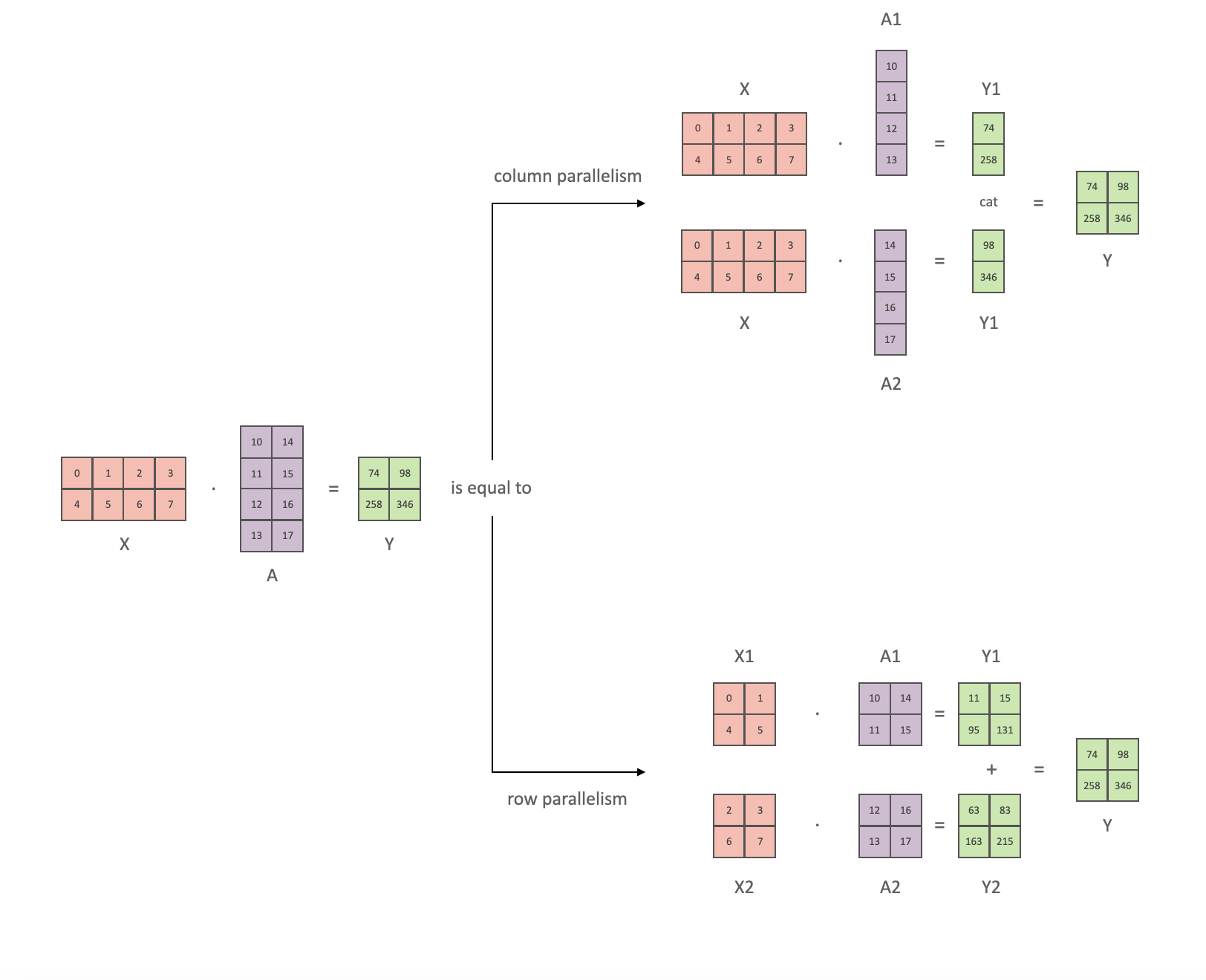
Figure 19: Tensor Parallel GEMM. This information is based on (the much more in-depth) TP Overview by @anton-l
3D Parallelism
DP+TP+PP(3D) Parallelism
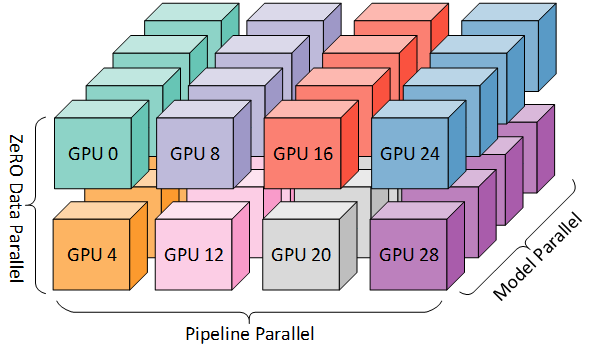
Figure 20: Figure taken from 3D parallelism: Scaling to trillion-parameter models
Deciding on a Parallelism Strategy
Single GPU
- Model fits onto a single GPU:
- Normal use
- Model DOES NOT fit on a single GPU:
ZeRO+ Offload CPU (or, optionally,NVMe)
- Largest layer DOES NOT fit on a single GPU:
ZeRO+ Enable Memory Centric Tiling (MCT)- MCT Allows running of arbitrarily large layers by automatically splitting them and executing them sequentially.
Single Node / Multi-GPU
- Model DOES NOT fit onto a single GPU
- With sufficiently fast connectivity between nodes, these three
strategies should be comparable.
- Otherwise,
PP>ZeROTP.
- Otherwise,
Multi-Node / Multi-GPU
- When you have fast inter-node connectivity:
-
ZeRO(virtually NO modifications) -
PP+ZeRO+TP+DP(less communication, at the cost of MAJOR modifications)-
when you have slow inter-node connectivity and still low on GPU memory:
DP + PP + TP + ZeRO-1
-
-
NOTE:
TPis almost always used within a single node, e.g.
TP <= GPUS_PER_NODE
-
🦙 Large Language Models

Figure 21: Large Language Models have (LLM)s have taken the NLP
community world by storm3.
🔮 Emergent Abilities
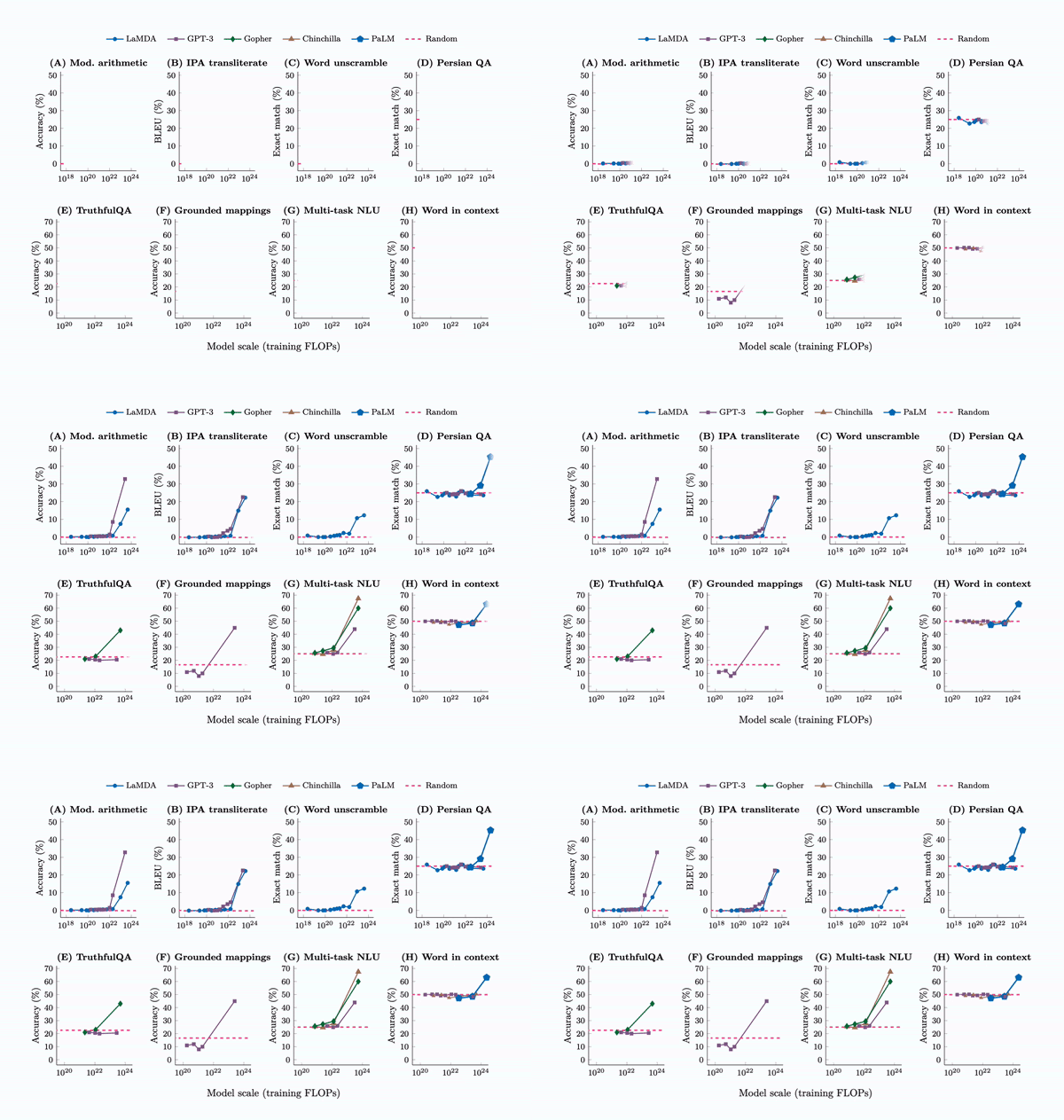
Figure 22: See Wei et al. (2022), Yao et al. (2023)
🚂 Training LLMs
♻️ Life-Cycle of the LLM
- Data collection + preprocessing
- Pre-training
- Architecture decisions, model size, etc.
- Supervised Fine-Tuning
- Instruction Tuning
- Alignment
- Deploy (+ monitor, re-evaluate, etc.)
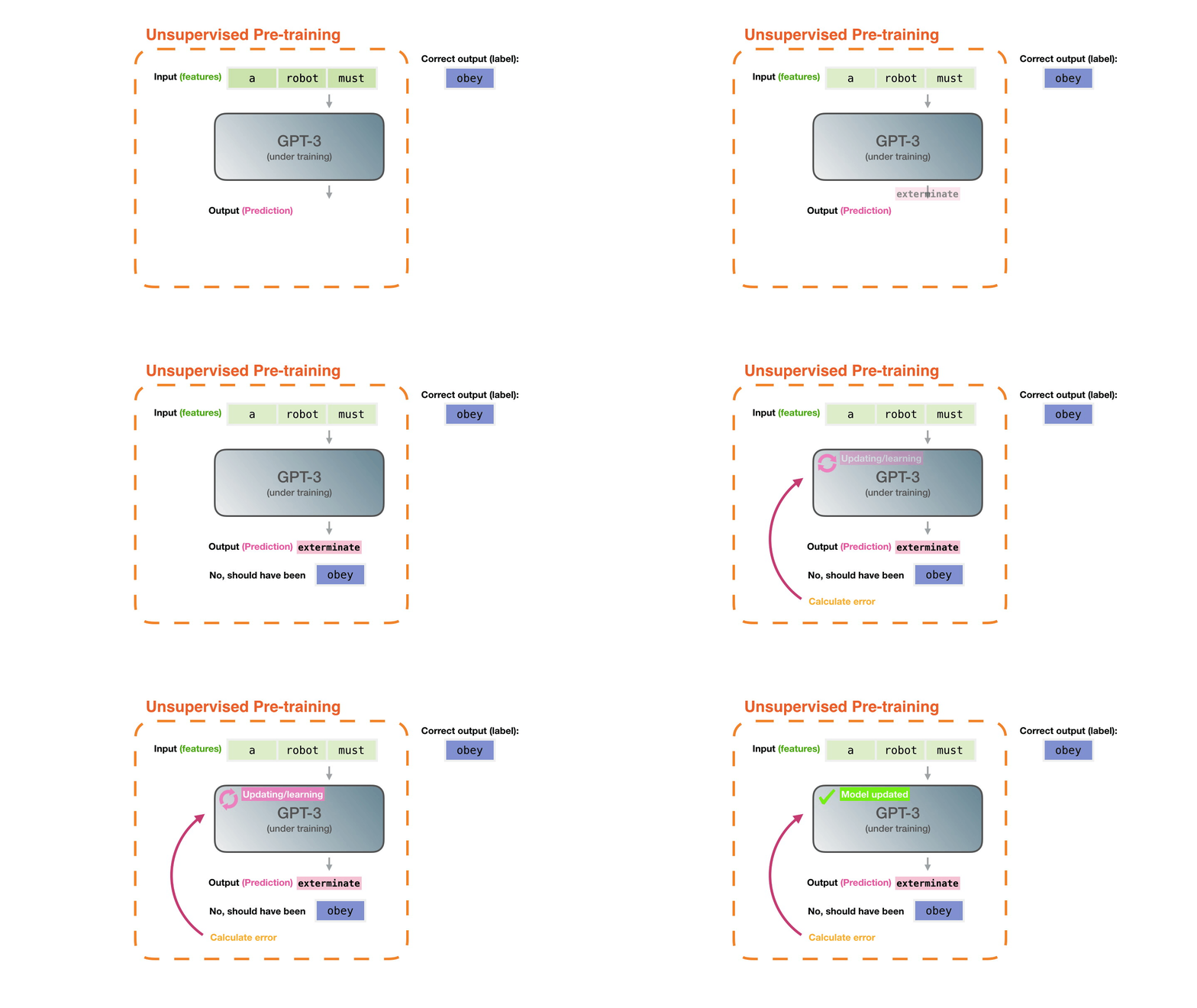
Figure 23: Pre-training: Virtually all of the compute used during pre-training4.
🎀 Life-Cycle of the LLM
- Data collection + preprocessing
- Pre-training
- Architecture decisions, model size, etc.
- Supervised Fine-Tuning
- Instruction Tuning
- Alignment
- Deploy (+ monitor, re-evaluate, etc.)
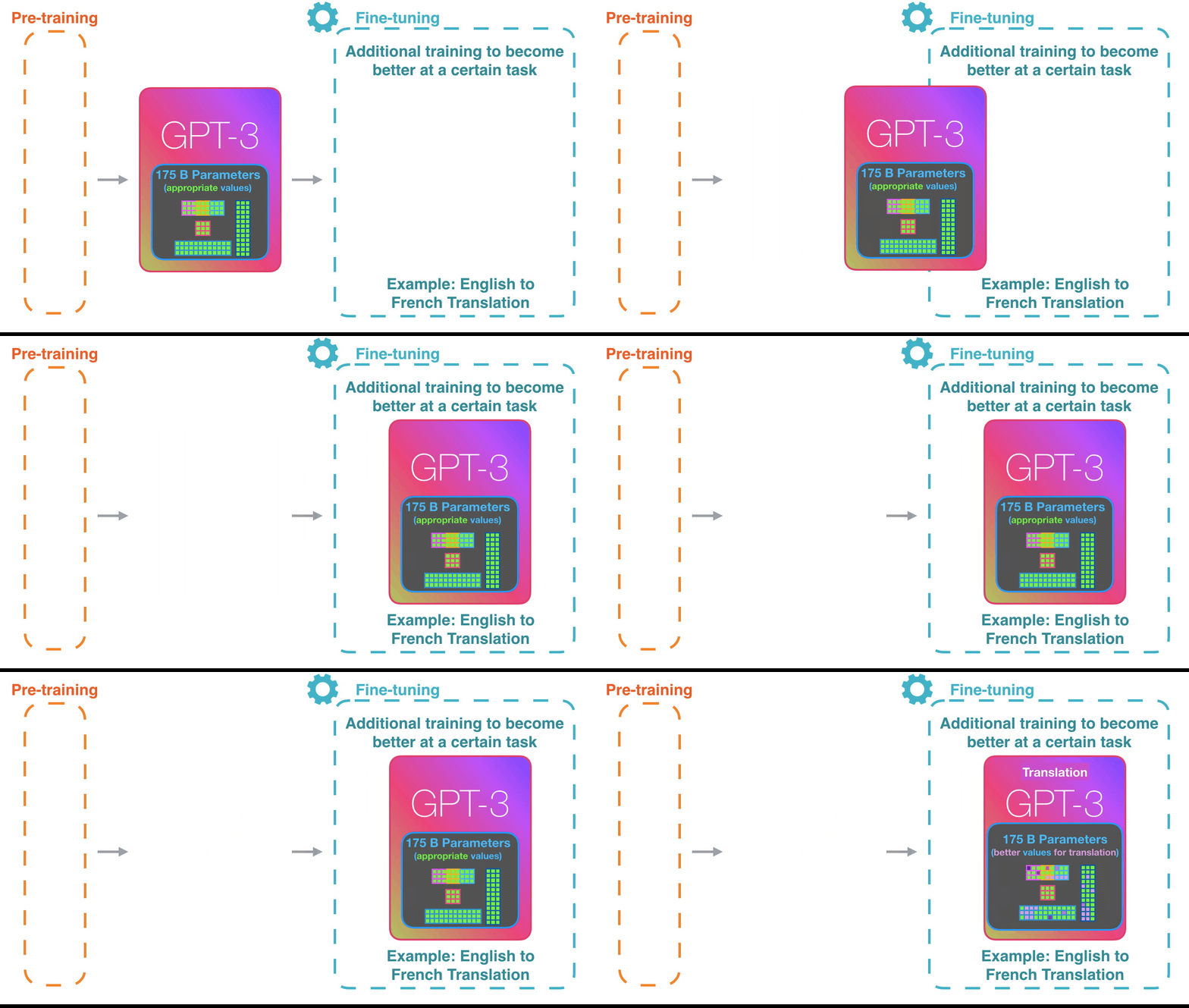
Figure 24: Fine-tuning: Fine-tuning actually updates the model’s weights to make the model better at a certain task5.
⏩ Forward Pass
Figure 25: Language Model trained for causal language modeling6.
💬 Generating Text
Figure 26: Language Model trained for causal language modeling7.
👋 Hands On
ai-science-training-series / 06_parallel_training
🧑💻 Hands On: Getting Started
-
🌱 Clone Repo(s):
git clone https://github.com/saforem2/wordplay cd wordplaygit clone https://github.com/saforem2/ezpz deps/ezpz -
🐍 Setup Python:
export PBS_O_WORKDIR=$(pwd) && source deps/ezpz/src/ezpz/bin/utils.sh
ezpz_setup_python
ezpz_setup_job
📦 Install wordplay
-
Install Python packages:
-
python3 -m pip install -e "./deps/ezpz" --require-virtualenv -
# from inside `wordplay/`
python3 -m pip install -e . --require-virtualenv
-
-
Test distributed setup:
mpirun -n "${NGPUS}" python3 -m ezpz.test_distSee: 🍋
ezpz/test_dist.py
ezpz: Example [video]
Figure 27: Example: using 🍋
ezpz.test_dist
to train a small model using DDP
Install wordplay 🎮💬
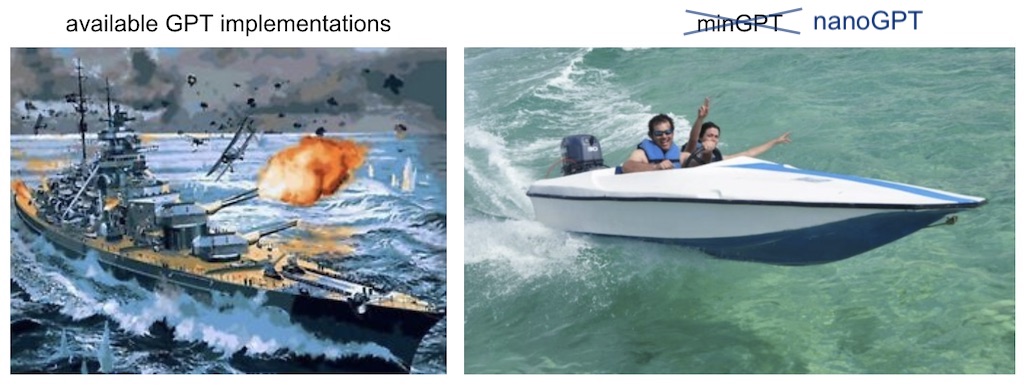
Figure 28: The simplest, fastest repository for training / finetuning
GPT based models. Figure from
karpathy/nanoGPT
Prepare Data
$ python3 wordplay/data/shakespeare_char/prepare.py
Using HF_DATASETS_CACHE=/home/foremans/tmp/polaris-talk/2024-07-17-073327/wordplay/data/shakespeare_char/.cache/huggingface
length of dataset in characters: 1,115,394
all the unique characters:
 !$&\',-.3:;?ABCDEFGHIJKLMNOPQRSTUVWXYZabcdefghijklmnopqrstuvwxyz
vocab size: 65
train has 1,003,854 tokens
val has 111,540 tokens
Launch Training (DDP)
launch python3 -m wordplay \
    train.backend=DDP \
    train.eval_interval=100 \
    data=shakespeare \
    train.dtype=bf16 \
    model.batch_size=64 \
    model.block_size=1024 \
    train.max_iters=1000 \
    train.log_interval=10 \
    train.compile=false \
    | tee wordplay-gpt2-DDP.log
Training: Example Output
$ launch python3 -m wordplay \
    train.backend=DDP \
    train.eval_interval=100 \
    data=shakespeare \
    train.dtype=bf16 \
    model.batch_size=64 \
    model.block_size=1024 \
    train.max_iters=1000 \
    train.log_interval=10 \
    train.compile=false \
    | tee wordplay-gpt2-DDP.log
[2024-07-17 07:42:11.746540][INFO][__init__:156] - Setting logging level to 'INFO' on 'RANK == 0'
[2024-07-17 07:42:11.748763][INFO][__init__:157] - Setting logging level to 'CRITICAL' on all others 'RANK != 0'
[2024-07-17 07:42:11.749453][INFO][__init__:160] - To disable this behavior, and log from ALL ranks (not recommended), set: 'export LOG_FROM_ALL_RANKS=1'  in your environment, and re-run.
[2024-07-17 07:42:11.772718][INFO][configs:81] - Setting HF_DATASETS_CACHE to /home/foremans/tmp/polaris-talk/2024-07-17-073327/wordplay/.cache/huggingface/datasets
[2024-07-17 07:42:15.341532][INFO][dist:358] - [device='cuda'][rank=2/3][local_rank=2/3][node=0/0]
[2024-07-17 07:42:15.342381][INFO][dist:358] - [device='cuda'][rank=1/3][local_rank=1/3][node=0/0]
[2024-07-17 07:42:15.342430][INFO][dist:358] - [device='cuda'][rank=3/3][local_rank=3/3][node=0/0]
[2024-07-17 07:42:15.348657][INFO][dist:95] -

[dist_info]:
  • DEVICE=cuda
  • DEVICE_ID=cuda:0
  • DISTRIBUTED_BACKEND=nccl
  • GPUS_PER_NODE=4
  • HOSTS=['x3101c0s13b0n0.hsn.cm.polaris.alcf.anl.gov']
  • HOSTFILE=/var/spool/pbs/aux/2024084.polaris-pbs-01.hsn.cm.polaris.alcf.anl.gov
  • HOSTNAME=x3101c0s13b0n0.hsn.cm.polaris.alcf.anl.gov
  • LOCAL_RANK=0
  • MACHINE=Polaris
  • NUM_NODES=1
  • NGPUS=4
  • NGPUS_AVAILABLE=4
  • NODE_ID=0
  • RANK=0
  • SCHEDULER=PBS
  • WORLD_SIZE_TOTAL=4
  • WORLD_SIZE_IN_USE=4
  • LAUNCH_CMD=mpiexec --verbose --envall -n 4 -ppn 4 --hostfile /var/spool/pbs/aux/2024084.polaris-pbs-01.hsn.cm.polaris.alcf.anl.gov --cpu-bind depth -d 16

[2024-07-17 07:42:15.351446][INFO][dist:725] - [0/4] Using device='cuda' with backend='DDP' + 'nccl' for distributed training.
[2024-07-17 07:42:15.356169][INFO][dist:358] - [device='cuda'][rank=0/3][local_rank=0/3][node=0/0]
[2024-07-17 07:42:15.356692][WARNING][dist:364] - Using [4 / 4] available "cuda" devices !!
[2024-07-17 07:42:15.359571][INFO][configs:317] - Loading val from /home/foremans/tmp/polaris-talk/2024-07-17-073327/wordplay/data/shakespeare_char/val.bin
[2024-07-17 07:42:15.360138][INFO][configs:317] - Loading train from /home/foremans/tmp/polaris-talk/2024-07-17-073327/wordplay/data/shakespeare_char/train.bin
[2024-07-17 07:42:15.361154][INFO][configs:442] - Tokens per iteration: 262,144
[2024-07-17 07:42:15.361574][INFO][configs:465] - Using self.ptdtype=torch.float16 on self.device_type='cuda'
[2024-07-17 07:42:15.362002][INFO][configs:471] - Initializing a new model from scratch
[2024-07-17 07:42:15.362529][INFO][dist:874] - Setting up wandb from rank: 0
[2024-07-17 07:42:15.362896][INFO][dist:875] - Using: WB PROJECT: WordPlay
[2024-07-17 07:42:16.451786][INFO][dist:905] - W&B RUN: [still-frog-17](https://wandb.ai/aurora_gpt/WordPlay/runs/6by9vpcj)
[2024-07-17 07:42:16.464106][INFO][dist:312] - Updating wandb.run: still-frog-17 config with "DIST_INFO"
[2024-07-17 07:42:16.469424][INFO][dist:938] - Running on machine='Polaris'
[2024-07-17 07:42:16.471151][WARNING][__main__:89] - {
    "train": {
        "framework": "pytorch",
        "backend": "DDP",
        "device": null,
        "seed": null,
        "port": null,
        "ds_config_path": null,
        "precision": null,
        "ngpus": null,
        "use_wandb": true,
        "eval_interval": 100,
        "log_interval": 10,
        "eval_iters": 200,
        "eval_only": false,
        "always_save_checkpoint": false,
        "init_from": "scratch",
        "wandb_project": "WordPlay",
        "max_iters": 1000,
        "warmup_iters": 100,
        "dtype": "bf16",
        "compile": false
    },
    "model": {
        "n_layer": 12,
        "n_head": 12,
        "n_embd": 768,
        "batch_size": 64,
        "block_size": 1024,
        "activation": "gelu",
        "dropout": 0.0,
        "bias": false,
        "vocab_size": 65
    },
    "data": {
        "dataset": "shakespeare_char",
        "out_dir": "out-shakespeare-char",
        "root_path": null
    },
    "optimizer": {
        "gas": 1,
        "name": "AdamW",
        "learning_rate": 0.0006,
        "weight_decay": 0.1,
        "beta1": 0.9,
        "beta2": 0.95,
        "grad_clip": 1.0,
        "decay_lr": true,
        "lr_decay_iters": 600000,
        "min_lr": 6e-05
    }
}
[2024-07-17 07:42:16.474305][WARNING][__main__:90] - Output dir: /home/foremans/tmp/polaris-talk/outputs/runs/pytorch/DDP/2024-07-17/07-42-13
[2024-07-17 07:42:16.474922][INFO][trainer:246] - Initializing a new model from scratch
[2024-07-17 07:42:17.258904][INFO][model:255] - number of parameters: 85.00M
[2024-07-17 07:42:17.290004][INFO][trainer:264] - Model size: num_params=85003776
[2024-07-17 07:42:17.292626][INFO][model:445] - num decayed parameter tensors: 50, with 85,771,008 parameters
[2024-07-17 07:42:17.293296][INFO][model:449] - num non-decayed parameter tensors: 25, with 19,200 parameters
[2024-07-17 07:42:17.515324][CRITICAL][trainer:316] - "devid='cuda:1'"
[2024-07-17 07:42:17.515340][CRITICAL][trainer:316] - "devid='cuda:2'"
[2024-07-17 07:42:17.515465][CRITICAL][trainer:316] - "devid='cuda:3'"
[2024-07-17 07:42:18.431814][INFO][model:465] - using fused AdamW: True
[2024-07-17 07:42:18.432620][CRITICAL][trainer:316] - "devid='cuda:0'"
[2024-07-17 07:42:19.951020][INFO][trainer:356] - • self.model=GPT(
  (transformer): ModuleDict(
    (wte): Embedding(65, 768)
    (wpe): Embedding(1024, 768)
    (drop): Dropout(p=0.0, inplace=False)
    (h): ModuleList(
      (0-11): 12 x Block(
        (ln_1): LayerNorm()
        (attn): CausalSelfAttention(
          (c_attn): Linear(in_features=768, out_features=2304, bias=False)
          (c_proj): Linear(in_features=768, out_features=768, bias=False)
          (attn_dropout): Dropout(p=0.0, inplace=False)
          (resid_dropout): Dropout(p=0.0, inplace=False)
        )
        (ln_2): LayerNorm()
        (mlp): MLP(
          (c_fc): Linear(in_features=768, out_features=3072, bias=False)
          (act_fn): GELU(approximate='none')
          (c_proj): Linear(in_features=3072, out_features=768, bias=False)
          (dropout): Dropout(p=0.0, inplace=False)
        )
      )
    )
    (ln_f): LayerNorm()
  )
  (lm_head): Linear(in_features=768, out_features=65, bias=False)
)
[2024-07-17 07:42:19.955340][INFO][trainer:357] - • self.grad_scaler=<torch.cuda.amp.grad_scaler.GradScaler object at 0x145a38f0f090>
[2024-07-17 07:42:19.956897][INFO][trainer:358] - • self.model_engine=DistributedDataParallel(
  (module): GPT(
    (transformer): ModuleDict(
      (wte): Embedding(65, 768)
      (wpe): Embedding(1024, 768)
      (drop): Dropout(p=0.0, inplace=False)
      (h): ModuleList(
        (0-11): 12 x Block(
          (ln_1): LayerNorm()
          (attn): CausalSelfAttention(
            (c_attn): Linear(in_features=768, out_features=2304, bias=False)
            (c_proj): Linear(in_features=768, out_features=768, bias=False)
            (attn_dropout): Dropout(p=0.0, inplace=False)
            (resid_dropout): Dropout(p=0.0, inplace=False)
          )
          (ln_2): LayerNorm()
          (mlp): MLP(
            (c_fc): Linear(in_features=768, out_features=3072, bias=False)
            (act_fn): GELU(approximate='none')
            (c_proj): Linear(in_features=3072, out_features=768, bias=False)
            (dropout): Dropout(p=0.0, inplace=False)
          )
        )
      )
      (ln_f): LayerNorm()
    )
    (lm_head): Linear(in_features=768, out_features=65, bias=False)
  )
)
[2024-07-17 07:42:19.961066][INFO][trainer:359] - • self.optimizer=AdamW (
Parameter Group 0
    amsgrad: False
    betas: (0.9, 0.95)
    capturable: False
    differentiable: False
    eps: 1e-08
    foreach: None
    fused: True
    lr: 0.0006
    maximize: False
    weight_decay: 0.1

Parameter Group 1
    amsgrad: False
    betas: (0.9, 0.95)
    capturable: False
    differentiable: False
    eps: 1e-08
    foreach: None
    fused: True
    lr: 0.0006
    maximize: False
    weight_decay: 0.0
)
[2024-07-17 07:42:19.988827][INFO][trainer:802] - Startup time: 6.7125
                Training Legend
┏━━━━━━━━━━━━━┳━━━━━━━━━━━━━━━━━━━━━━━━━━━━━━━━┓
┃    abbr     ┃ desc                           ┃
┡━━━━━━━━━━━━━╇━━━━━━━━━━━━━━━━━━━━━━━━━━━━━━━━┩
│    step     │ Current training iteration     │
│    loss     │ Loss value                     │
│     dt      │ Elapsed time per training step │
│     dtf     │ Elapsed time per forward step  │
│     dtb     │ Elapsed time per backward step │
│     sps     │ Samples per second             │
│ sps_per_gpu │ Samples per second (per GPU)   │
│     tps     │ Tokens per second              │
│ tps_per_gpu │ Tokens per second (per GPU)    │
│     mfu     │ Model flops utilization        │
│ train_loss  │ Training loss value            │
│  val_loss   │ Validation loss value          │
└─────────────┴────────────────────────────────┘
[2024-07-17 07:42:21.451865][INFO][trainer:820] - ['prompt']: 'What is an LLM?'
[2024-07-17 07:42:21.452667][INFO][trainer:824] - ['response']:
What is an LLM?eelEl\'$nltPwBSWal,;PWw bbu\'HiyP\'FWwF &AhW:ygrn kk-\'\'KFlMwnlEfflkc,elpWaWtgml$Pgglhllw lglhFllzczPAFHpeAAPPSltgkrWPPhlEMgcrN ggPWt-WPSSzHSkkrzzk.FFrtSSkgMll&gFXr,hghaueaVPW-pHFF-gg,,,FF,,kbApgg gg\'aWWzzkk\'a\'CggHl$bGeA,FFk,,SF;UF,,aZ ;gglee$,k.US&kg:S,,zVzzc
[2024-07-17 07:43:01.573073][INFO][trainer:885] - step=10 loss=3.154310 dt=0.282833 dtf=0.005247 dtb=0.011417 sps=14.142633 sps_per_gpu=3.535658 tps=926851.609409 tps_per_gpu=231712.902352 mfu=46.288281 train_loss=4.125778 val_loss=4.128809
[2024-07-17 07:43:04.402750][INFO][trainer:885] - step=20 loss=2.660851 dt=0.306263 dtf=0.005233 dtb=0.011419 sps=13.060678 sps_per_gpu=3.265170 tps=855944.613638 tps_per_gpu=213986.153409 mfu=45.934162 train_loss=4.125778 val_loss=4.128809
[2024-07-17 07:43:07.237507][INFO][trainer:885] - step=30 loss=2.543283 dt=0.283021 dtf=0.005238 dtb=0.011245 sps=14.133211 sps_per_gpu=3.533303 tps=926234.088226 tps_per_gpu=231558.522057 mfu=45.966490 train_loss=4.125778 val_loss=4.128809
[2024-07-17 07:43:10.077248][INFO][trainer:885] - step=40 loss=2.503963 dt=0.285001 dtf=0.005213 dtb=0.011471 sps=14.035061 sps_per_gpu=3.508765 tps=919801.749941 tps_per_gpu=229950.437485 mfu=45.963461 train_loss=4.125778 val_loss=4.128809
[2024-07-17 07:43:12.917039][INFO][trainer:885] - step=50 loss=2.477469 dt=0.283532 dtf=0.005166 dtb=0.011294 sps=14.107763 sps_per_gpu=3.526941 tps=924566.380009 tps_per_gpu=231141.595002 mfu=45.984530 train_loss=4.125778 val_loss=4.128809
[2024-07-17 07:43:15.760749][INFO][trainer:885] - step=60 loss=2.471083 dt=0.284630 dtf=0.005140 dtb=0.011224 sps=14.053326 sps_per_gpu=3.513332 tps=920998.786204 tps_per_gpu=230249.696551 mfu=45.985675 train_loss=4.125778 val_loss=4.128809
[2024-07-17 07:43:18.602785][INFO][trainer:885] - step=70 loss=2.458894 dt=0.283926 dtf=0.005219 dtb=0.010383 sps=14.088155 sps_per_gpu=3.522039 tps=923281.352698 tps_per_gpu=230820.338174 mfu=45.998106 train_loss=4.125778 val_loss=4.128809
[2024-07-17 07:43:21.451433][INFO][trainer:885] - step=80 loss=2.489088 dt=0.285537 dtf=0.005183 dtb=0.011373 sps=14.008683 sps_per_gpu=3.502171 tps=918073.060430 tps_per_gpu=229518.265108 mfu=45.983282 train_loss=4.125778 val_loss=4.128809
[2024-07-17 07:43:24.302241][INFO][trainer:885] - step=90 loss=2.471990 dt=0.300767 dtf=0.005445 dtb=0.010290 sps=13.299337 sps_per_gpu=3.324834 tps=871585.359388 tps_per_gpu=217896.339847 mfu=45.737774 train_loss=4.125778 val_loss=4.128809
[2024-07-17 07:43:27.153275][INFO][trainer:885] - step=100 loss=2.445556 dt=0.285869 dtf=0.005182 dtb=0.011251 sps=13.992403 sps_per_gpu=3.498101 tps=917006.151328 tps_per_gpu=229251.537832 mfu=45.743655 train_loss=4.125778 val_loss=4.128809
[2024-07-17 07:43:28.182553][INFO][trainer:820] - ['prompt']: 'What is an LLM?'
[2024-07-17 07:43:28.183179][INFO][trainer:824] - ['response']:

What is an LLM?

Goupay my winghimithell bls ger t bon sinthard ht omind be,
And lereind h py balithand frd oforondof wimon me hageas thinero mand,
Thacanes,
An frift ghik med d herthecke ntore thack couthen ale, t thit ang d m t h chy me fache ag, wit my hathan glat ng
[2024-07-17 07:44:06.025837][INFO][trainer:760] - Saving checkpoint to: /home/foremans/tmp/polaris-talk/outputs/runs/pytorch/DDP/2024-07-17/07-42-13
[2024-07-17 07:44:06.026607][INFO][trainer:761] - Saving model to: /home/foremans/tmp/polaris-talk/outputs/runs/pytorch/DDP/2024-07-17/07-42-13/model.pth
[2024-07-17 07:44:07.682968][INFO][configs:141] - Appending /home/foremans/tmp/polaris-talk/outputs/runs/pytorch/DDP/2024-07-17/07-42-13 to /home/foremans/tmp/polaris-talk/2024-07-17-073327/wordplay/src/ckpts/checkpoints.log
[2024-07-17 07:44:10.519506][INFO][trainer:885] - step=110 loss=2.433923 dt=0.285038 dtf=0.005757 dtb=0.011762 sps=14.033209 sps_per_gpu=3.508302 tps=919680.367894 tps_per_gpu=229920.091974 mfu=45.762304 train_loss=2.439494 val_loss=2.478951
[2024-07-17 07:44:13.362148][INFO][trainer:885] - step=120 loss=2.429014 dt=0.284445 dtf=0.005222 dtb=0.011486 sps=14.062460 sps_per_gpu=3.515615 tps=921597.361532 tps_per_gpu=230399.340383 mfu=45.788661 train_loss=2.439494 val_loss=2.478951
[2024-07-17 07:44:16.210694][INFO][trainer:885] - step=130 loss=2.402059 dt=0.285559 dtf=0.005199 dtb=0.011765 sps=14.007633 sps_per_gpu=3.501908 tps=918004.211586 tps_per_gpu=229501.052897 mfu=45.794438 train_loss=2.439494 val_loss=2.478951
[2024-07-17 07:44:19.061546][INFO][trainer:885] - step=140 loss=2.374062 dt=0.285476 dtf=0.005239 dtb=0.011453 sps=14.011662 sps_per_gpu=3.502916 tps=918268.297093 tps_per_gpu=229567.074273 mfu=45.800956 train_loss=2.439494 val_loss=2.478951
[2024-07-17 07:44:21.917283][INFO][trainer:885] - step=150 loss=2.365385 dt=0.285846 dtf=0.005125 dtb=0.011320 sps=13.993568 sps_per_gpu=3.498392 tps=917082.475791 tps_per_gpu=229270.618948 mfu=45.800900 train_loss=2.439494 val_loss=2.478951
[2024-07-17 07:44:24.771924][INFO][trainer:885] - step=160 loss=2.317337 dt=0.280788 dtf=0.005173 dtb=0.011249 sps=14.245602 sps_per_gpu=3.561401 tps=933599.792506 tps_per_gpu=233399.948127 mfu=45.883340 train_loss=2.439494 val_loss=2.478951
[2024-07-17 07:44:27.626812][INFO][trainer:885] - step=170 loss=2.256231 dt=0.284973 dtf=0.005141 dtb=0.011299 sps=14.036416 sps_per_gpu=3.509104 tps=919890.544506 tps_per_gpu=229972.636126 mfu=45.889069 train_loss=2.439494 val_loss=2.478951
[2024-07-17 07:44:30.480952][INFO][trainer:885] - step=180 loss=2.216419 dt=0.286555 dtf=0.005180 dtb=0.011402 sps=13.958906 sps_per_gpu=3.489726 tps=914810.852170 tps_per_gpu=228702.713043 mfu=45.868857 train_loss=2.439494 val_loss=2.478951
[2024-07-17 07:44:33.337342][INFO][trainer:885] - step=190 loss=2.145123 dt=0.291456 dtf=0.005409 dtb=0.019347 sps=13.724205 sps_per_gpu=3.431051 tps=899429.467247 tps_per_gpu=224857.366812 mfu=45.773849 train_loss=2.439494 val_loss=2.478951
[2024-07-17 07:44:36.194584][INFO][trainer:885] - step=200 loss=2.068149 dt=0.285703 dtf=0.005153 dtb=0.011286 sps=14.000555 sps_per_gpu=3.500139 tps=917540.393411 tps_per_gpu=229385.098353 mfu=45.778791 train_loss=2.439494 val_loss=2.478951
[2024-07-17 07:44:37.224149][INFO][trainer:820] - ['prompt']: 'What is an LLM?'
[2024-07-17 07:44:37.224745][INFO][trainer:824] - ['response']:

What is an LLM?

LORTESS LA:
No, sighappat selace? don downd sourciceans note cancen up sof liond
This and my man, werame, of re thee
Thise not will I on land brond sul me a fingore?

FLER:
Tisint your not nare lame o igen,-to brorst.

SamERS:
Sin:
I\'l hell she lor hen w
[2024-07-17 07:45:14.409129][INFO][trainer:760] - Saving checkpoint to: /home/foremans/tmp/polaris-talk/outputs/runs/pytorch/DDP/2024-07-17/07-42-13
[2024-07-17 07:45:14.409820][INFO][trainer:761] - Saving model to: /home/foremans/tmp/polaris-talk/outputs/runs/pytorch/DDP/2024-07-17/07-42-13/model.pth
[2024-07-17 07:45:16.366935][INFO][configs:141] - Appending /home/foremans/tmp/polaris-talk/outputs/runs/pytorch/DDP/2024-07-17/07-42-13 to /home/foremans/tmp/polaris-talk/2024-07-17-073327/wordplay/src/ckpts/checkpoints.log
[2024-07-17 07:45:19.245061][INFO][trainer:885] - step=210 loss=1.982169 dt=0.283305 dtf=0.005223 dtb=0.011284 sps=14.119042 sps_per_gpu=3.529760 tps=925305.515083 tps_per_gpu=231326.378771 mfu=45.822019 train_loss=2.045786 val_loss=2.148510
[2024-07-17 07:45:22.092430][INFO][trainer:885] - step=220 loss=1.897731 dt=0.284759 dtf=0.005217 dtb=0.011187 sps=14.046945 sps_per_gpu=3.511736 tps=920580.608106 tps_per_gpu=230145.152026 mfu=45.837327 train_loss=2.045786 val_loss=2.148510
[2024-07-17 07:45:24.942639][INFO][trainer:885] - step=230 loss=1.817213 dt=0.285266 dtf=0.005208 dtb=0.011446 sps=14.022003 sps_per_gpu=3.505501 tps=918945.985503 tps_per_gpu=229736.496376 mfu=45.842940 train_loss=2.045786 val_loss=2.148510
[2024-07-17 07:45:27.797910][INFO][trainer:885] - step=240 loss=1.779287 dt=0.285465 dtf=0.005189 dtb=0.011220 sps=14.012250 sps_per_gpu=3.503062 tps=918306.793546 tps_per_gpu=229576.698387 mfu=45.844800 train_loss=2.045786 val_loss=2.148510
[2024-07-17 07:45:30.653597][INFO][trainer:885] - step=250 loss=1.704220 dt=0.289284 dtf=0.005471 dtb=0.010346 sps=13.827253 sps_per_gpu=3.456813 tps=906182.836379 tps_per_gpu=226545.709095 mfu=45.785926 train_loss=2.045786 val_loss=2.148510
[2024-07-17 07:45:33.512769][INFO][trainer:885] - step=260 loss=1.671318 dt=0.287679 dtf=0.005125 dtb=0.011250 sps=13.904380 sps_per_gpu=3.476095 tps=911237.442617 tps_per_gpu=227809.360654 mfu=45.758182 train_loss=2.045786 val_loss=2.148510
[2024-07-17 07:45:36.373461][INFO][trainer:885] - step=270 loss=1.650952 dt=0.298661 dtf=0.005118 dtb=0.011520 sps=13.393107 sps_per_gpu=3.348277 tps=877730.651421 tps_per_gpu=219432.662855 mfu=45.565875 train_loss=2.045786 val_loss=2.148510
[2024-07-17 07:45:39.236930][INFO][trainer:885] - step=280 loss=1.573242 dt=0.285970 dtf=0.005171 dtb=0.011290 sps=13.987477 sps_per_gpu=3.496869 tps=916683.279847 tps_per_gpu=229170.819962 mfu=45.587333 train_loss=2.045786 val_loss=2.148510
[2024-07-17 07:45:42.100605][INFO][trainer:885] - step=290 loss=1.533265 dt=0.286487 dtf=0.005432 dtb=0.011288 sps=13.962259 sps_per_gpu=3.490565 tps=915030.617828 tps_per_gpu=228757.654457 mfu=45.598392 train_loss=2.045786 val_loss=2.148510
[2024-07-17 07:45:44.964424][INFO][trainer:885] - step=300 loss=1.492064 dt=0.288480 dtf=0.005355 dtb=0.011480 sps=13.865774 sps_per_gpu=3.466443 tps=908707.340870 tps_per_gpu=227176.835218 mfu=45.576766 train_loss=2.045786 val_loss=2.148510
[2024-07-17 07:45:45.995833][INFO][trainer:820] - ['prompt']: 'What is an LLM?'
[2024-07-17 07:45:45.996497][INFO][trainer:824] - ['response']:

What is an LLM?

RICHMORD:
Char stire? how in those are name the range hone.

GLOUCESTER:
Nay, in lond's time the palt are worder more
That wilt in the purpose be a pey
And thou thine onter hands, and the which broth.

ELBOWINCA:
At lie my lord with the me an arms be a s
[2024-07-17 07:46:23.549987][INFO][trainer:760] - Saving checkpoint to: /home/foremans/tmp/polaris-talk/outputs/runs/pytorch/DDP/2024-07-17/07-42-13
[2024-07-17 07:46:23.550696][INFO][trainer:761] - Saving model to: /home/foremans/tmp/polaris-talk/outputs/runs/pytorch/DDP/2024-07-17/07-42-13/model.pth
[2024-07-17 07:46:25.496559][INFO][configs:141] - Appending /home/foremans/tmp/polaris-talk/outputs/runs/pytorch/DDP/2024-07-17/07-42-13 to /home/foremans/tmp/polaris-talk/2024-07-17-073327/wordplay/src/ckpts/checkpoints.log
[2024-07-17 07:46:28.374854][INFO][trainer:885] - step=310 loss=1.444200 dt=0.299907 dtf=0.005333 dtb=0.010637 sps=13.337481 sps_per_gpu=3.334370 tps=874085.133345 tps_per_gpu=218521.283336 mfu=45.384395 train_loss=1.495372 val_loss=1.713714
[2024-07-17 07:46:31.223079][INFO][trainer:885] - step=320 loss=1.429350 dt=0.285238 dtf=0.005245 dtb=0.011485 sps=14.023353 sps_per_gpu=3.505838 tps=919034.479880 tps_per_gpu=229758.619970 mfu=45.435743 train_loss=1.495372 val_loss=1.713714
[2024-07-17 07:46:34.074957][INFO][trainer:885] - step=330 loss=1.362220 dt=0.285027 dtf=0.005165 dtb=0.011407 sps=14.033736 sps_per_gpu=3.508434 tps=919714.904826 tps_per_gpu=229928.726207 mfu=45.485355 train_loss=1.495372 val_loss=1.713714
[2024-07-17 07:46:36.929464][INFO][trainer:885] - step=340 loss=1.350888 dt=0.284436 dtf=0.005199 dtb=0.011287 sps=14.062893 sps_per_gpu=3.515723 tps=921625.744709 tps_per_gpu=230406.436177 mfu=45.539549 train_loss=1.495372 val_loss=1.713714wordplay: Example [video]
Figure 29: Training a LLM to talk like Shakespeare using
saforem2/wordplay 🎮💬
❤️ Thank you!
Acknowledgements
This research used resources of the Argonne Leadership Computing Facility, which is a DOE Office of Science User Facility supported under Contract DE-AC02-06CH11357
📓 References
- Title slide (Tetris animation) from: emilhvitfeldt/quarto-iframe-examples
Wei, Jason, Yi Tay, Rishi Bommasani, et al. 2022. Emergent Abilities of Large Language Models. https://arxiv.org/abs/2206.07682.
Yao, Shunyu, Dian Yu, Jeffrey Zhao, et al. 2023. Tree of Thoughts: Deliberate Problem Solving with Large Language Models. https://arxiv.org/abs/2305.10601.
Footnotes
-
micro_batch_size= batch_size per GPU ↩ -
Efficient Large-Scale Language Model Training on GPU Clusters ↩
-
Source:
Hannibal046/Awesome-LLM↩ -
Figure from The Illustrated Transformer ↩
-
Figure from The Illustrated Transformer ↩
-
Video from: 🤗 Generation with LLMs ↩
-
Video from: 🤗 Generation with LLMs ↩