Sam Foreman
Oct 15, 2025
10/15/25
11 min read
Sam Foreman
2025-10-15
🌐 Distributed Training
🚀 Scaling: Overview
In this talk, we will explore the intricacies of training foundation
models on supercomputers. We will discuss the architecture of these
models, the computational requirements, and the strategies employed to
optimize training processes. Attendees will gain insights into the
latest advancements in hardware and software that facilitate efficient
model training at scale.
🐢 Training on a Single Device
flowchart LR
subgraph G0["`GPU0`"]
subgraph N0["`Network`"]
end
L0("`Loss`")
end
subgraph D["`Data`"]
x("`x0`")
x1("`x1`")
x2("`x2`")
end
x --> N0
N0 --> L0
L0 --> N0
classDef block fill:#CCCCCC02,stroke:#838383,stroke-width:1px,color:#838383
classDef eblock fill:#CCCCCC02,stroke:#838383,stroke-width:0px,color:#838383
classDef red fill:#ff8181,stroke:#333,stroke-width:1px,color:#000
classDef green fill:#98E6A5,stroke:#333,stroke-width:1px,color:#000
classDef blue fill:#7DCAFF,stroke:#333,stroke-width:1px,color:#000
classDef grey fill:#cccccc,stroke:#333,stroke-width:1px,color:#000
class x,L0 red
class x1 green
class x2 blue
class x3 grey
class N0,G0,n0 block
class D eblock
Figure 1: SLOW !! model size limited by GPU memory
🕸️ Parallelism Strategies
- Data Parallelism
- Split data across workers
- Easiest to implement
- No changes to model
- Model Parallelism
- Split model across workers
- Hybrid Parallelism
- Combine data + model parallelism
- More complex to implement
- Requires changes to model
👬 Training on Multiple GPUs: Data Parallelism
flowchart LR
subgraph D["`Data`"]
direction TB
x2("`x2`")
x1("`x1`")
x("`x0`")
end
direction LR
subgraph G0["`GPU0`"]
direction LR
subgraph N0["`NN`"]
end
%%y0("`y₀`")
L0["`Loss`"]
end
subgraph G1["`GPU1`"]
direction LR
subgraph N1["`NN`"]
end
L1["`Loss`"]
end
subgraph G2["`GPU2`"]
direction LR
subgraph N2["`NN`"]
end
L2["`Loss`"]
end
x --> N0
x1 --> N1
x2 --> N2
N0 --> L0
N1 --> L1
N2 --> L2
classDef block fill:#CCCCCC02,stroke:#838383,stroke-width:1px,color:#838383
classDef eblock fill:#CCCCCC02,stroke:#838383,stroke-width:0px,color:#838383
classDef text fill:#CCCCCC02,stroke:#838383,stroke-width:0px,color:#838383
classDef grey fill:#cccccc,stroke:#333,stroke-width:1px,color:#000
classDef red fill:#ff8181,stroke:#333,stroke-width:1px,color:#000
classDef orange fill:#FFC47F,stroke:#333,stroke-width:1px,color:#000
classDef yellow fill:#FFFF7F,stroke:#333,stroke-width:1px,color:#000
classDef green fill:#98E6A5,stroke:#333,stroke-width:1px,color:#000
classDef blue fill:#7DCAFF,stroke:#333,stroke-width:1px,color:#000
classDef purple fill:#FFCBE6,stroke:#333,stroke-width:1px,color:#000
classDef eblock fill:#CCCCCC02,stroke:#838383,stroke-width:0px,color:#838383
class x,y0,L0 red
class x1,L1 green
class x2,L2 blue
class x3,ar grey
class N0,N1,N2,G0,G1,G2,GU block
class D eblock
class AR block
class bc text
Figure 2: Each GPU receives unique data at each step
▶️ Data Parallel: Forward Pass
flowchart LR
subgraph D["`Data`"]
direction TB
x("`x0`")
x1("`x1`")
x2("`x2`")
end
direction LR
subgraph G0["`GPU0`"]
direction LR
subgraph N0["`NN`"]
end
L0["`Loss`"]
end
subgraph G1["`GPU1`"]
direction LR
subgraph N1["`NN`"]
end
L1["`Loss`"]
end
subgraph G2["`GPU2`"]
direction LR
subgraph N2["`NN`"]
end
L2["`Loss`"]
end
ar("`Avg. Grads (∑ₙgₙ)/N`")
x --> G0
x1 --> G1
x2 --> G2
N0 --> L0
N1 --> L1
N2 --> L2
L0 -.-> ar
L1 -.-> ar
L2 -.-> ar
classDef eblock fill:#CCCCCC02,stroke:#838383,stroke-width:0px,color:#838383
classDef block fill:#CCCCCC02,stroke:#838383,stroke-width:1px,color:#838383
classDef grey fill:#cccccc,stroke:#333,stroke-width:1px,color:#000
classDef red fill:#ff8181,stroke:#333,stroke-width:1px,color:#000
classDef orange fill:#FFC47F,stroke:#333,stroke-width:1px,color:#000
classDef yellow fill:#FFFF7F,stroke:#333,stroke-width:1px,color:#000
classDef green fill:#98E6A5,stroke:#333,stroke-width:1px,color:#000
classDef blue fill:#7DCAFF,stroke:#333,stroke-width:1px,color:#000
classDef purple fill:#FFCBE6,stroke:#333,stroke-width:1px,color:#000
classDef text fill:#CCCCCC02,stroke:#838383,stroke-width:0px,color:#838383
class x,y0,L0 red
class x1,L1 green
class x2,L2 blue
class x3,ar grey
class N0,N1,N2,G0,G1,G2,GU block
class D eblock
class AR block
class bc text
Figure 3: Average gradients across all GPUs
◀️ Data Parallel: Backward Pass
flowchart RL
subgraph D["`Data`"]
direction TB
x("`x0`")
x1("`x1`")
x2("`x1`")
end
subgraph G0["`GPU0`"]
direction RL
subgraph N0["`NN`"]
end
L0["`Loss`"]
end
subgraph G1["`GPU1`"]
direction RL
subgraph N1["`NN`"]
end
L1["`Loss`"]
end
subgraph G2["`GPU2`"]
direction RL
subgraph N2["`NN`"]
end
L2["`Loss`"]
end
subgraph BC["`Send Updates`"]
direction TB
end
BC -.-> G0
BC -.-> G1
BC -.-> G2
L0 ~~~ N0
L1 ~~~ N1
L2 ~~~ N2
G0 ~~~ x
G1 ~~~ x1
G2 ~~~ x2
classDef grey fill:#cccccc,stroke:#333,stroke-width:1px,color:#000
classDef eblock fill:#CCCCCC02,stroke:#838383,stroke-width:0px,color:#838383
classDef block fill:#CCCCCC02,stroke:#838383,stroke-width:1px,color:#838383
classDef red fill:#ff8181,stroke:#333,stroke-width:1px,color:#000
classDef orange fill:#FFC47F,stroke:#333,stroke-width:1px,color:#000
classDef yellow fill:#FFFF7F,stroke:#333,stroke-width:1px,color:#000
classDef green fill:#98E6A5,stroke:#333,stroke-width:1px,color:#000
classDef blue fill:#7DCAFF,stroke:#333,stroke-width:1px,color:#000
classDef purple fill:#FFCBE6,stroke:#333,stroke-width:1px,color:#000
classDef text fill:#CCCCCC02,stroke:#838383,stroke-width:0px,color:#838383
class x,y0,L0 red
class x1,L1 green
class x2,L2 blue
class x3,ar grey
class N0,N1,N2,G0,G1,G2,GU block
class BC block
class bc text
class D eblock
Figure 4: Send global updates back to each GPU. See: PyTorch /
Distributed Data
Parallel
🔄 Collective Communication
- Broadcast: Send data from one node to all other nodes
- Reduce: Aggregate data from all nodes to one node
- AllReduce: Aggregate data from all nodes to all nodes
- Gather: Collect data from all nodes to one node
- AllGather: Collect data from all nodes to all nodes
- Scatter: Distribute data from one node to all other nodes
Reduce
- Perform a reduction on data across ranks, send to individual
flowchart TD
subgraph R0["`0`"]
x0("`x0`")
end
subgraph R1["`1`"]
x1("`x1`")
end
subgraph R2["`2`"]
x2("`x2`")
end
subgraph R3["`3`"]
x3("`x3`")
end
subgraph AR["`Reduce`"]
xp["`z=reduce(x, 2, SUM)`"]
end
subgraph AR3["`3`"]
end
subgraph AR2["`2`"]
xp2("`z`")
end
subgraph AR1["`1`"]
end
subgraph AR0["`0`"]
end
x0 --> AR
x1 --> AR
x2 --> AR
x3 --> AR
AR --> AR3
AR --> xp2
AR --> AR1
AR --> AR0
classDef block fill:#CCCCCC02,stroke:#838383,stroke-width:1px,color:#838383
classDef red fill:#ff8181,stroke:#333,stroke-width:1px,color:#000
classDef orange fill:#FFC47F,stroke:#333,stroke-width:1px,color:#000
classDef green fill:#98E6A5,stroke:#333,stroke-width:1px,color:#000
classDef yellow fill:#FFFF7F,stroke:#333,stroke-width:1px,color:#000
classDef blue fill:#7DCAFF,stroke:#333,stroke-width:1px,color:#000
classDef purple fill:#FFCBE6,stroke:#333,stroke-width:1px,color:#000
classDef pink fill:#E599F7,stroke:#333,stroke-width:1px,color:#000
class R0,R1,R2,R3,AR,AR0,AR1,AR2,AR3 block
class xp,xp2 purple
class x0 red
class x1 green
class x2 blue
class x3 yellow
Figure 5: Reduce operation: one rank receives the reduction of input
values across ranks
🐣 Getting Started: In Practice
- 📦 Distributed Training Frameworks:
- 🚀 DeepSpeed
- 🧠 Memory Management:
- FSDP vs. ZeRO
- Activation Checkpointing
- Mixed Precision Training
- Gradient Accumulation
- Offloading to CPU/NVMe
🔄 Keeping things in Sync
Computation stalls during communication !!
Keeping the communication to computation ratio small is important for
effective scaling.
📝 Plan of Attack
flowchart TB
A{"Model Perfect?"}
A -- no --> M{"Available Memory?"}
A -- yes --> AD["Done"]
M -- yes --> MY["Make Model Larger"]
M -- no --> ZMP["<b>Free Up Memory</b>"]
MY --> A
ZMP --> MY
A:::block
M:::block
AD:::block
MY:::block
ZMP:::sblock
classDef text fill:#CCCCCC02,stroke:#838383,stroke-width:0px,color:#838383
classDef sblock fill:#CCCCCC02,stroke:#838383,stroke-width:1px,color:#838383,white-space:collapse
classDef block fill:#CCCCCC02,stroke:#838383,stroke-width:1px,color:#838383
Figure 6: General strategy for scaling model training
🚀 Going Beyond Data Parallelism
- ✅ Useful when model fits on single GPU:
- ultimately limited by GPU memory
- model performance limited by size
- ⚠️ When model does not fit on a single GPU:
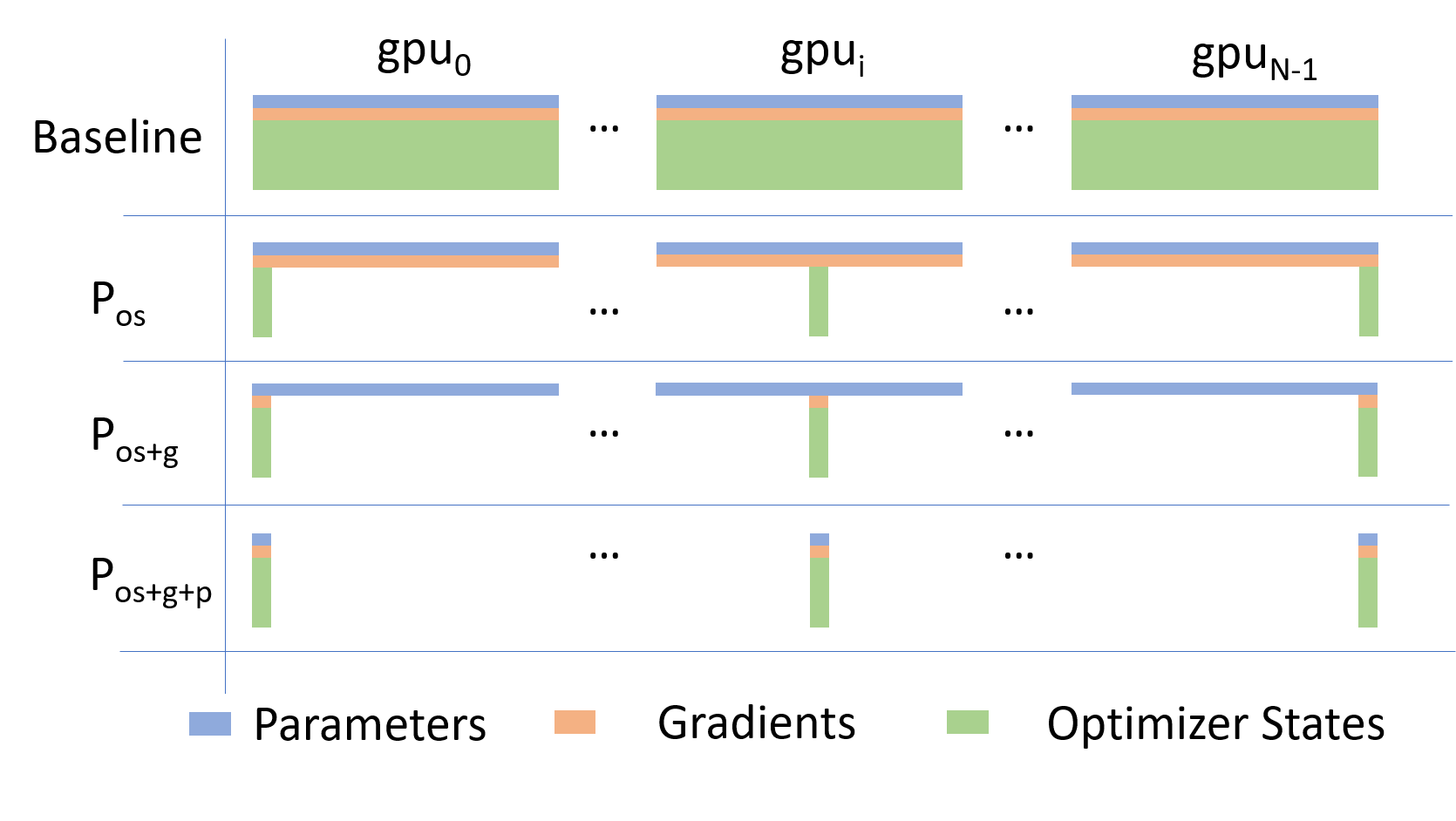
Going beyond Data Parallelism: DeepSpeed + ZeRO
- Depending on the
ZeRO stage (1, 2, 3), we can offload:
- Stage 1: optimizer states (Pos)
- Stage 2: gradients + opt. states
(Pos+g)
- Stage 3: model params + grads + opt. states
(Pos+g+p)
🕸️ Additional Parallelism Strategies
Pipeline Parallelism (PP)
- Model is split up vertically (layer-level) across multiple GPUs
- Each GPU:
- has a portion of the full model
- processes in parallel different stages of the pipeline (on a small
chunk of the batch)
- See:
flowchart TB
subgraph G0["`GPU 0`"]
direction LR
a0("`Layer 0`")
b0("`Layer 1`")
end
subgraph G1["`GPU 1`"]
direction LR
a1("`Layer 2`")
b1("`Layer 3`")
end
a0 -.-> b0
b0 --> a1
a1 -.-> b1
classDef block fill:#CCCCCC02,stroke:#838383,stroke-width:1px,color:#838383
classDef red fill:#ff8181,stroke:#333,stroke-width:1px,color:#000
classDef orange fill:#FFC47F,stroke:#333,stroke-width:1px,color:#000
classDef yellow fill:#FFFF7F,stroke:#333,stroke-width:1px,color:#000
classDef green fill:#98E6A5,stroke:#333,stroke-width:1px,color:#000
classDef blue fill:#7DCAFF,stroke:#333,stroke-width:1px,color:#000
classDef purple fill:#FFCBE6,stroke:#333,stroke-width:1px,color:#000
class G0,G1 block
class a0 red
class b0 green
class a1 blue
class b1 yellow
Figure 8: Pipeline Parallelism
Tensor Parallel (TP)
Tensor Parallel (TP)
- Split up network over multiple workers
- Each receives disjoint subset
- All communication associated with subsets are distributed
- Communication whenever dataflow between two subsets
- Typically more complicated to implement than data parallel
training
- Suitable when the model is too large to fit onto a single device (CPU
/ GPU)
Tensor (/ Model) Parallel Training: Example
Want to compute:
y=∑ixiWi=x0∗W0+x1∗W1+x2∗W2
where each GPU has only its portion of the full weights as shown below
- Compute: y0=x0∗W0→
GPU1
- Compute: y1=y0+x1∗W1→
GPU2
- Compute: y=y1+x2∗W2=∑ixiWi ✅
flowchart LR
subgraph X0["`GPU0`"]
direction LR
a("`W0`")
end
subgraph X1["`GPU1`"]
direction LR
b("`W1`")
end
subgraph X2["`GPU2`"]
direction LR
c("`W2`")
end
t0("`x0`")-->X0
X0 -->|"`x0 W0`"|X1
X1 -->|"`x0 W0 + x1 W1`"|X2
t1("`x1`") --> X1
t2("`x1`") --> X2
Figure 11
🌀 Sequence-Window-Pipeline Parallelism SWiPe
SWiPe is a novel parallelism strategy for Swin-based
Transformers- Hybrid 3D Parallelism strategy, combining:
- Sequence parallelism (
SP)
- Window parallelism (
WP)
- Pipeline parallelism (
PP)
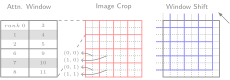
Figure 23
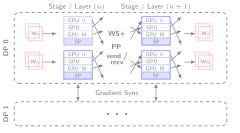
Figure 24: SWiPe Communication Patterns
🚀 AERIS: Scaling Results
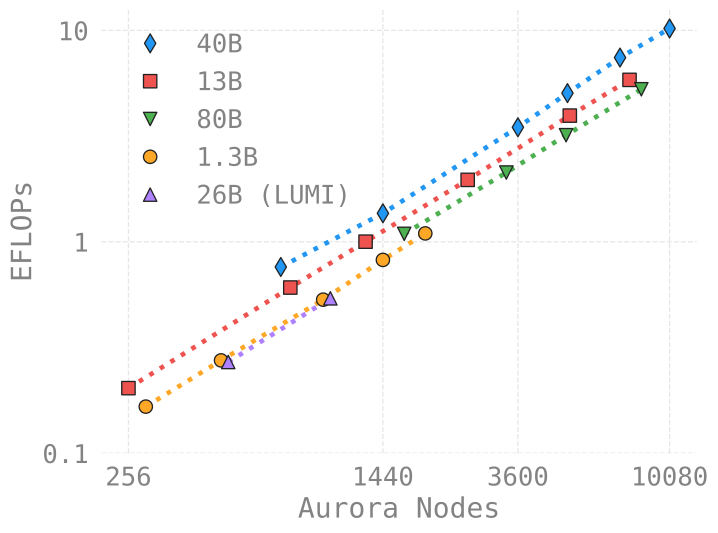
Figure 25: AERIS: Scaling Results
- 10 EFLOPs (sustained) @ 120,960
GPUs
- See (Hatanpää et al. (2025)) for additional details
- arXiv:2509.13523
🌪️ Hurricane Laura
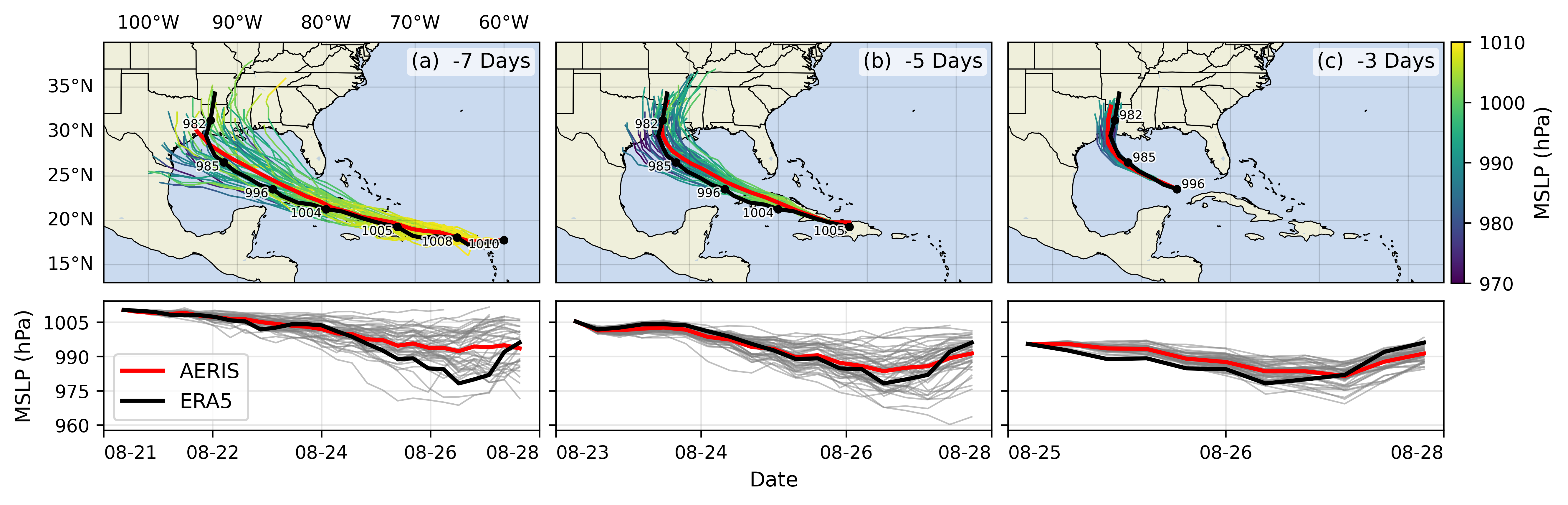
Figure 26: Hurricane Laura tracks (top) and intensity (bottom).
Initialized 7(a), 5(b) and 3(c) days prior to 2020-08-28T00z.
📓 References
Hatanpää, Väinö, Eugene Ku, Jason Stock, et al. 2025. AERIS: Argonne
Earth Systems Model for Reliable and Skillful Predictions.
https://arxiv.org/abs/2509.13523.
Price, Ilan, Alvaro Sanchez-Gonzalez, Ferran Alet, et al. 2024.
GenCast: Diffusion-Based Ensemble Forecasting for Medium-Range
Weather. https://arxiv.org/abs/2312.15796.
Song, Shuaiwen Leon, Bonnie Kruft, Minjia Zhang, et al. 2023.
DeepSpeed4Science Initiative: Enabling Large-Scale Scientific Discovery
Through Sophisticated AI System Technologies.
https://arxiv.org/abs/2310.04610.
❤️ Acknowledgements
This research used resources of the Argonne Leadership Computing
Facility, which is a DOE Office of Science User Facility supported
under Contract DE-AC02-06CH11357.