Running 50k Python Processes on Aurora with ezpz yeet
How ezpz yeet distributes Python environments to every worker node in an HPC job, and how it scales from 8 to 4096 nodes on Aurora.
On large HPC clusters, every Python import that touches the shared filesystem is
a small tax — and at scale, a small tax paid by every rank turns into minutes of
dead time before training even starts.
ezpz yeet copies any directory or tarball to node-local /tmp/
storage on every worker in your job, so subsequent imports, checkpoint loads,
and config reads hit local SSD instead of Lustre.
This post covers what yeet does, how it scales, and a 10-point benchmark sweep
on Aurora from 8 to 4096 nodes.
Note:
ezpz yeet-envwas renamed toezpz yeet. The old name still works as a deprecated alias.
What it does
Inside an interactive job allocation:
ezpz yeet                          # no args → syncs the active venv
ezpz yeet .venv.tar.gz             # positional shorthand for --src
ezpz yeet --src /path/to/dataset   # any directory or tarball
The default flow (no args):
- Detect the active Python environment via
sys.prefix. - Discover all nodes from the job’s hostfile (PBS or SLURM).
- Copy the environment to
/tmp/<env-name>/on the current node. - Patch
activatescripts, shebangs, and symlinks for the new/tmp/location. - Distribute the patched copy to every remote node via a greedy rsync fan-out.
For non-venv sources (datasets, model checkpoints, generic directories), step 4 is skipped and the trailing message changes to a generic “Synced to {dst}/ on N node(s)”.
After yeet, switch to the local copy and launch:
deactivate 2>/dev/null
source /tmp/.venv/bin/activate
cd /path/to/your/project        # shared FS for data/outputs
ezpz launch python3 -m your_app.train
/tmp/ is node-local — keep your working directory on a shared filesystem so
all ranks can read inputs and write outputs.
CLI surface
ezpz yeet [SRC] [--src PATH] [--dst PATH] [--hostfile PATH]
[--copy | --compress] [--dry-run]| Arg / Flag | Default | Description |
|---|---|---|
SRC (positional) | — | Source path. Shorthand for --src. Mutually exclusive with --src |
--src | active venv / conda env | Source path. May also be a .tar.gz / .tgz — see tarball source |
--dst | /tmp/<basename>/ | Destination on each node |
--hostfile | auto-detect | Hostfile for node list |
--copy | — | Use cp -a for the local copy (faster on Lustre) |
--compress | — | tar.gz → copy → extract (least Lustre metadata I/O) |
--dry-run | — | Preview without transferring |
Choosing a local copy method
The default rsync is best for incremental updates (after a pip install,
etc.) but slow for initial copies on Lustre because it stat()s every file.
For the first transfer, prefer one of the faster methods:
| Method | Best for | How it works |
|---|---|---|
--copy | fast initial copy | cp -a — sequential dir walk, no checksums |
--compress | slow Lustre / large envs | tar.gz → copy 1 file → extract locally |
| (default) | incremental updates | rsync -rlD — only transfers changed files |
# First time: compress for minimal Lustre I/O
ezpz yeet --compress

# Or: cp for simpler fast copy
ezpz yeet --copy

# After pip install: rsync only sends diffs
ezpz yeet
All three methods only affect the local Lustre → /tmp/ copy.
Remote node distribution always uses rsync.
Tarball source
If you already have a .tar.gz (e.g. one built earlier with ezpz tar-env, or
shipped with a project), pass it directly:
ezpz yeet --src /lus/.../my-env.tar.gzThis is similar to --compress but skips the create step — the tarball is
copied to /tmp/ and extracted there:
cp /lus/.../my-env.tar.gz /tmp/my-env.tar.gztar -xzf /tmp/my-env.tar.gz --strip-components=1 -C /tmp/my-env/- Patch shebangs / activate scripts (auto-detected from
bin/activate) - Delete the tarball
- Fan-out
/tmp/my-env/to all worker nodes via rsync
Both .tar.gz and .tgz are recognized.
Default destination is /tmp/<basename-without-suffix>/.
Generic (non-venv) sources
yeet works on any directory:
# A pre-downloaded HF model checkpoint
ezpz yeet ~/models/Llama-3.1-8B

# A dataset shard
ezpz yeet --src /lus/datasets/imagenet-shard-0
When the source isn’t a venv (no bin/activate) and isn’t a conda env (no
conda-meta/), the path-patching step is skipped.
How it works
Local copy + patch
yeet first copies the source to /tmp/<env>/ on the current node using
rsync (default), cp -a (--copy), or tar.gz (--compress).
If this fails, distribution is aborted immediately — no broken environment gets
propagated.
After copying, the venv is patched once in place:
- Replaces hardcoded
VIRTUAL_ENVpaths inbin/activate,bin/activate.csh,bin/activate.fish. - Re-links
python3symlinks to the system Python. - Updates
pyvenv.cfg. - Rewrites shebangs in every entry-point script (
ezpz,pip,torchrun, etc.) —pipbakes absolute paths into these at install time, so without this step they’d still point at the original Lustre location.
This patched copy in /tmp/ becomes the source for all subsequent rsyncs — no
per-node patching, no SSH round-trips needed.
Greedy fan-out
A single source can only push to ~8 nodes at a time before the source NIC
saturates, so yeet uses a greedy streaming fan-out:
each node that finishes immediately becomes a source for the next available
target.
A single thread pool manages all rsyncs.
Each source is capped at MAX_PER_SOURCE=8 concurrent outbound rsyncs.
As each rsync completes:
- That node is registered as a new source.
- New rsyncs are submitted using whichever source has the fewest active transfers (load-balanced).
The fan-out tree grows recursively — each newly-served node immediately becomes a source for up to 8 more:
Faster nodes don’t wait for slower ones:
if node01 finishes in 15 s but node08 takes 30 s, node01 is already
serving new targets while node08 is still receiving.
The result is approximately O(log N) wall-clock at moderate scale, until
per-node contention starts to dominate (more on that below).
Scaling on Aurora: 8 → 4096 nodes
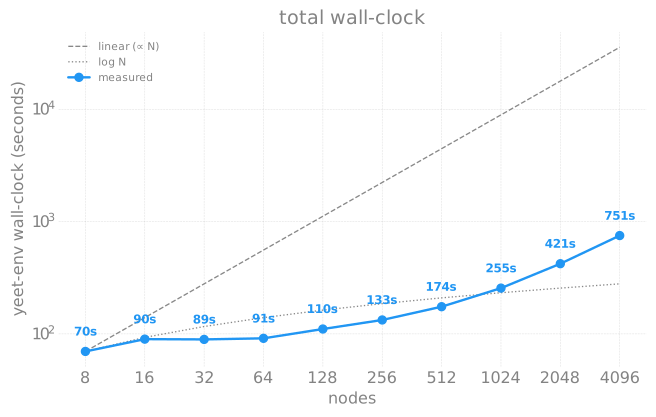
Full 10-point sweep using the tarball broadcast mode (ezpz yeet --src .venv.tar.gz) on Aurora, measured 2026-04-30 to 2026-05-01.
The benchmark harness lives in saforem2/torchtitan@ezpz along with
the raw CSV and plotting script.
Each job ran ezpz yeet --src .venv.tar.gz, then 10 training steps of agpt_2b
to verify the broadcast venv was functional.
first_step_seconds is the wall-clock from job start to the first training step
— a useful proxy for total time-to-train, including import + initialization on
top of the yeet itself.
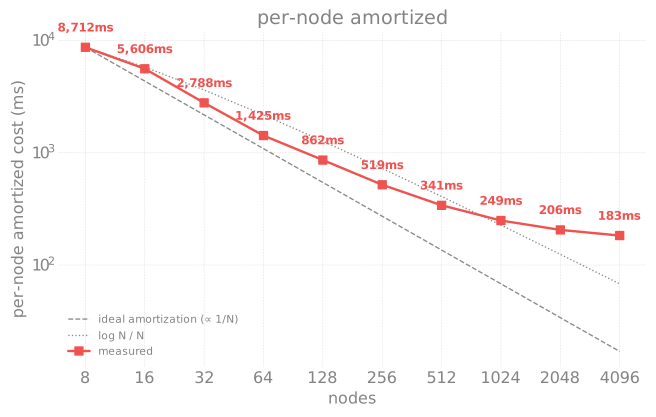
| Nodes | yeet (s) | First-step (s) | Per-node (ms) |
|---|---|---|---|
| 8 | 69.7 | 29.3 | 8,712 |
| 16 | 89.7 | 31.6 | 5,606 |
| 32 | 89.2 | 20.9 | 2,788 |
| 64 | 91.2 | 34.6 | 1,425 |
| 128 | 110.4 | 30.5 | 862 |
| 256 | 132.9 | 37.6 | 519 |
| 512 | 174.5 | 44.5 | 341 |
| 1024 | 255.4 | 60.8 | 249 |
| 2048 | 421.4 | 94.8 | 206 |
| 4096 | 750.6 | 194.0 | 183 |
Two regimes
- 8–64 nodes is extract-bound. Total wall-clock is roughly flat at 70–91 s; per-node cost falls 8.7 s → 1.4 s as more nodes share the fixed-cost local extraction.
- ≥128 nodes is broadcast-bound. Total wall-clock grows super-linearly. Each 2× in node count adds ~1.5–1.8× wall-clock (256→512: 1.31×, 512→1024: 1.46×, 1024→2048: 1.65×, 2048→4096: 1.78×) — the broadcast tree depth and per-leaf bandwidth contention both grow with scale.
Per-node amortized cost drops monotonically from 8.7 s/node at N=8 to 0.18 s/node at N=4096 — a 48× efficiency gain over the sweep. Even at the full-Aurora 4096-node scale, the pre-launch overhead is under 13 minutes.
First-step latency stays under a minute through 1024 nodes and only really
starts to climb at 2048+ — consistent with init_process_group overhead growing
with world size.
At 4096 nodes the first step lands in 3 min 14 s, so total time-to-train (yeet +
first step) is about 16 minutes.
Why tarball broadcast scales so much better than per-file rsync
The pre-tarball yeet mode (per-file rsync) was projected to take 1–2 hours at
256+ nodes — per-file metadata cost dominates over Lustre.
Switching to a single compressed tarball (--compress or pre-built --src foo.tar.gz) reduces the Lustre side to one sequential read regardless of node
count, so the broadcast itself is the only thing that scales with N.
Reproducing
The benchmark submits one PBS job per node count.
PBS limits concurrent submissions per user, so chain via qsub -W depend or a
polling wrapper:
# 8/16/32/64/128/256 → debug-scaling
for N in 8 16 32 64 128 256; do
    qsub -q debug-scaling -l select=$N -l walltime=00:30:00 \
        -N yeet-n$N \
        torchtitan/experiments/ezpz/scripts/yeet_env_scaling_test.sh
done

# 512/1024 → prod (auto-routes to small)
for N in 512 1024; do
    qsub -q prod -l select=$N -l walltime=01:00:00 \
        -N yeet-n$N \
        torchtitan/experiments/ezpz/scripts/yeet_env_scaling_test.sh
done

# 2048/4096 → prod (auto-routes to prod-large)
for N in 2048 4096; do
    qsub -q prod -l select=$N -l walltime=01:00:00 \
        -N yeet-n$N \
        torchtitan/experiments/ezpz/scripts/yeet_env_scaling_test.sh
done

# Plot once results have landed
python3 torchtitan/experiments/ezpz/docs/scaling/yeet_env/plot_yeet_env_scaling.py
Each job:
30-min walltime (1 h for ≥1024N), time yeet-env, then 10 training steps of
agpt_2b to verify the broadcast venv works.
Results land in .yeet-env-scaling-results.csv in the repo root.
Complete workflow
# 1. Get an interactive allocation
qsub -A <project> -q debug -l select=2 -l walltime=01:00:00 -I

# 2. Distribute the environment
ezpz yeet

# 3. Activate the local copy
deactivate 2>/dev/null
source /tmp/<env-name>/bin/activate

# 4. Launch from a shared filesystem path
cd /path/to/your/project
ezpz launch python3 -m your_app.train
See also
ezpz yeetCLI referenceezpz launch— distributed launcher (respects$VIRTUAL_ENVso it Just Works afteryeet+ activate)ezpz.utils.yeet_env— Python API reference- Shell environment helpers —
ezpz_setup_*(includingezpz_setup_xpufor Intel GPUs)