💅 How to Make Dope Slides
A guide to creating polished presentation slides using Quarto and Reveal.js with custom CSS.
Sam Foreman 2024-08-13
- Quarto 🤝 Reveal.js
- Getting Started
- Metadata
- Title Slide
- Single-Column Slides
- Centered Slides
- Multi-Column Slides
- 💅 CSS
- 📃 GitHub Page
- 📓 References
Quarto 🤝 Reveal.js
So, after making a promise some time ago on twitter [^1], and having many questions following my talk on Parallel Training Techniques last week, I’m finally getting around to writing this up.
The slides are written using Quarto, a flavor of Markdown, and uses the built-in Quarto + Reveal.js functionality.
For this post, I’ll focus on the slides I presented at last years Lattice 2023, shown below:
Tip
🏃♂️ Follow Along…
Once you’ve Installed Quarto, you can build these slides yourself by:
git clonesaforem2/lattice23cd lattice23 && quarto preview
This will create a docs/ directory with the following structure:
📂 docs/
├── 📂 assets/
├── 📂 css/
├── 📄 index.html
├── 📄 lattice23.md
├── 📄 search.json
└── 📂 site_libs/
Once you’ve created this, and the docs/index.html file looks how you
want, you can add the docs/ directory to your GitHub repo:
$ git add docs
$ git commit -m 'Create site'
$ git push
Once you’ve enabled the GitHub page, the site will be automatically built and updated alongside the repo.
Getting Started
Whenever I give a talk, my workflow is typically:
-
Create new GitHub repo for it
-
Hunt down the GitHub repo from my last talk and[^2]:
$ cp -r old_talk/{_quarto.yml,index.qmd,references.bib,css/*} new_talk/
Honestly, other than that, 90% of the work is done automatically by Quarto. The remaining 10% consists of figuring out why my css is broken (see CSS).
The best place to start for learning to make slides with Quarto and Reveal.js is the official documentation:
-
The slides are written in
markdownQuarto (.qmd)[^3], a pandoc-compliant based markup language. -
For a single slide deck, the content will be placed in
index.qmdand our directory structure will look something like:📂 lattice23/ ├── 📂 assets/ # for images, etc. │ └── 🖼️ thumbnail.png # can be used as social preview image ├── 📂 css/ │ ├── 📄 callouts.css │ ├── 📄 dark.scss │ └── 📄 default.css ├── 🛠️ _quarto.yml # Configuration goes here ├── 📄 index.qmd # Quarto document containing slides content └── 📜 references.bib # BibTex references -
Equations are rendered using
$delimiters for inline math and$$for display math[^4]. -
We can use Divs and Spans from Pandoc.
-
<span>’s: are created by wrapping text in square brackets, and will be treated as a<span>with attributes if it is followed immediately by attributes, e.g.:-
Example:
[This is *some text*]{.class key="val"} -
idk what I’m doing really, so I mostly find myself doing things like
[blue text]{style="color:#1E88E5;"}which produces blue text.
-
-
<div>’s: are created by wrapping text with a line consisting of at least three colons:::.-
Example:
::: {#special .sidebar} Here is a paragraph. And another. ::: -
We can use either attributes in curly braces or a single unbraced word, which will be treated as a class name.
-
-
🎁 Install Extensions
Find the full list of available extensions at Quarto Extensions
To install various icon sets used in the example slides, we can install the following extensions:
$ quarto install extension mcanouil/quarto-iconify      # https://icones.js.org/ [<-- Contains rest of icon sets ??]
$ quarto install extension shafayetShafee/bsicons       # bootstrap icons
$ quarto install extension schochastics/academicicons   # OrcID, Google Scholar, ...
$ quarto install extension quarto-ext/fontawesome       # Font Awesome icons
note that these aren’t necessary for functionality, but provide additional icons that I like to use 🤷🏻♂️
Metadata
The first section of our
index.qmd
contains the YAML metadata for the Quarto document.
Explicitly, we see this consists of:
Expand for yaml
---
format:
    revealjs:
        title-block-style: none
        slide-number: c
        title-slide-style: default
        chalkboard:
            buttons: false
        auto-animate: true
        reference-location: section
        touch: true
        pause: false
        footnotes-hover: true
        citations-hover: true
        preview-links: true
        controls-tutorial: true
        controls: false
        logo: 'https://raw.githubusercontent.com/saforem2/anl-job-talk/main/docs/assets/anl.svg'
        history: false
        theme: [dark, css/dark.scss]
        css: [css/default.css, css/callouts.css]
        self-contained: false
        embed-resources: false
        self-contained-math: false
        center: true
        highlight-style: 'atom-one'
        default-image-extension: svg
        code-line-numbers: true
        code-overflow: scroll
        html-math-method: katex
        fig-align: center
        mermaid:
            theme: dark
    gfm:
        output-file: 'lattice23.md'
---
The complete list of Reveal.js options are listed, with descriptions at: Quarto – Revealjs Options
Title Slide
-
Starting with the title slide[^5]:
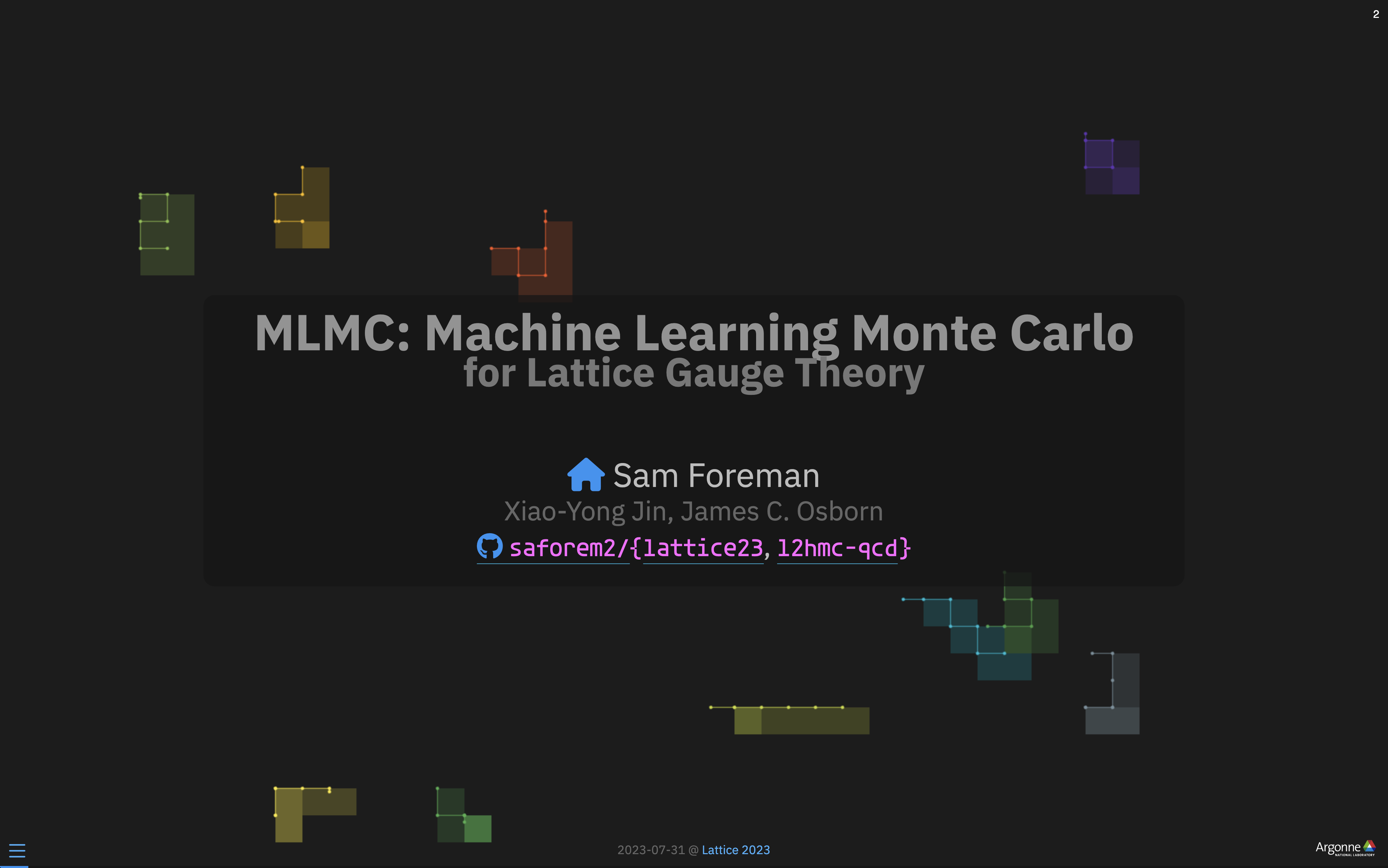
Figure 1: Title Slide
-
The full slide contents are included below:
Expand for
quarto# {.title-slide .centeredslide background-iframe="https://saforem2.github.io/grid-worms-animation/" loading="lazy"} ::: {style="background-color: rgba(22,22,22,0.75); border-radius: 10px; text-align:center; padding: 0px; padding-left: 1.5em; padding-right: 1.5em; max-width: min-content; min-width: max-content; margin-left: auto; margin-right: auto; padding-top: 0.2em; padding-bottom: 0.2em; line-height: 1.5em!important;"} [MLMC: Machine Learning Monte Carlo]{.style="color:#939393; font-size:1.5em; font-weight:bold;} [for Lattice Gauge Theory]{style="color:#777777; font-size:1.2em; font-weight: bold;"} [<br> ]{style="padding-bottom: 0.5rem;"} [](https://samforeman.me) Sam Foreman [Xiao-Yong Jin, James C. Osborn]{.dim-text style="font-size:0.8em;"} [[[ `saforem2/`](https://github.com/saforem2/)]{style="border-bottom: 0.5px solid #00ccff;"}`{`[[`lattice23`](https://github.com/saforem2/lattice23)]{style="border-bottom: 0.5px solid #00ccff;"}, [[`l2hmc-qcd`](https://github.com/saforem2/l2hmc-qcd)]{style="border-bottom: 0.5px solid #00ccff;"}`}`]{style="font-size:0.8em;"} ::: ::: footer [2023-07-31 @ [Lattice 2023](https://indico.fnal.gov/event/57249/contributions/271305/)]{.dim-text style="text-align:left;'} ::: -
For the background, I made a simple animation
saforem2/grid-worms-animationthat is hosted on GitHub pages as a simple html website -
This static GitHub page is then used as an IFrame Background natively in Quarto with Reveal.js
-
This is as simple as:
# {.title-slide .centeredslide background-iframe="https://saforem2.github.io/grid-worms-animation/" loading="lazy"}
-
Single-Column Slides
Other than the title slide, the remainder of the slides are all relatively straightforward to construct.
For single-column slides, constructing the content is as simple as writing it in Markdown:
Code
# Overview

1. [Background: `{MCMC,HMC}`](#markov-chain-monte-carlo-mcmc)
    - [Leapfrog Integrator](#leapfrog-integrator-hmc)
    - [Issues with HMC](#sec-issues-with-hmc)
    - [Can we do better?](#sec-can-we-do-better)

2. [L2HMC: Generalizing MD](#sec-l2hmc)
    - [4D $SU(3)$ Model](#sec-su3)
    - [Results](#sec-results)
3. [References](#sec-references)
4. [Extras](#sec-extras)
Slide
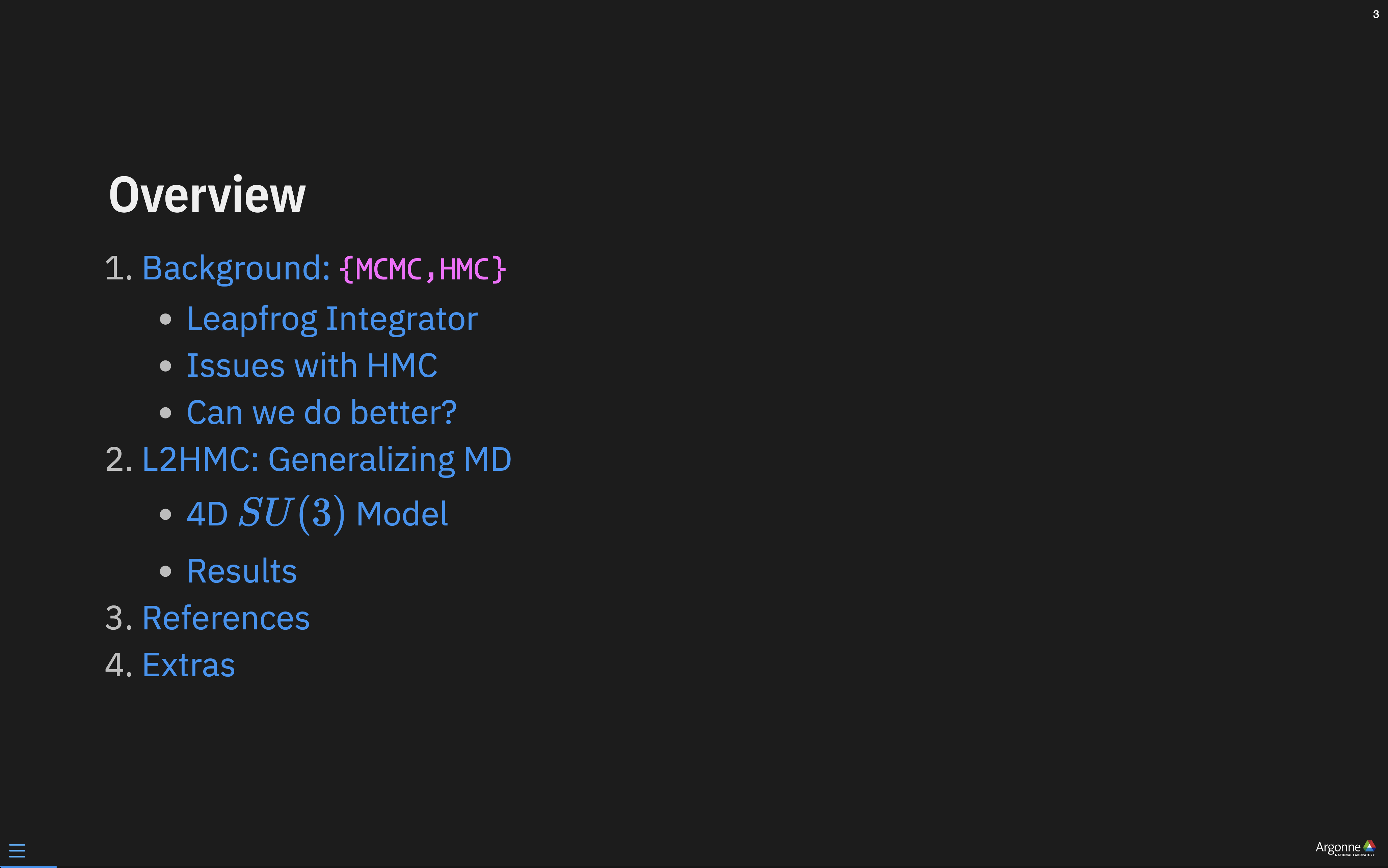
Figure 2: Overview Slide
Centered Slides
We can center all the text on a slide by adding the {.centeredslide}
class to the slide header, e.g.
index.qmd
---
format:
    revealjs:
        theme: [style.scss]
---

# Title {.centeredslide}
style.scss
.centeredslide {
    text-align: center;
}
Multi-Column Slides
Side-by-side content (either text or images)
-
Note that we additionally have a
::: footerelement included at the bottom of the slide. -
The code used to generate the slide above is included below:
Expand for
quarto# Markov Chain Monte Carlo (MCMC) {.centeredslide} :::: {.columns} ::: {.column width="50%"} ::: {.callout-note title="Goal" style="text-align:left;!important"} Generate **independent** samples $\{x_{i}\}$, such that[^notation] $$\{x_{i}\} \sim p(x) \propto e^{-S(x)}$$ where $S(x)$ is the _action_ (or potential energy) ::: - Want to calculate observables $\mathcal{O}$: $\left\langle \mathcal{O}\right\rangle \propto \int \left[\mathcal{D}x\right]\hspace{4pt} {\mathcal{O}(x)\, p(x)}$ ::: ::: {.column width="49%"} <img src="/assets/normal_distribution.dark.svg" /> ::: :::: If these were [independent]{.style="color:#00CCFF;"}, we could approximate: $\left\langle\mathcal{O}\right\rangle \simeq \frac{1}{N}\sum^{N}_{n=1}\mathcal{O}(x_{n})$ $$ \sigma_{\mathcal{O}}^{2} = \frac{1}{N}\mathrm{Var}{\left[\mathcal{O} (x) \right]}\Longrightarrow \sigma_{\mathcal{O}} \propto \frac{1}{\sqrt{N}} $$ [^notation]: Here, $\sim$ means "is distributed according to" ::: footer [ `saforem2/lattice23`](https://saforem2.github.io/lattice23) :::
💅 CSS
My web developer friend laughs at me, but when something is broken / doesn’t look right / I want it to look different, I:
- Pull up Chrome Tools ( ⌘ + ⌥ + I )
- Inspect element of interest ( ⌘ + ⇧ + C )
- Make changes to the CSS
- Save the new rule to my
.scssfile 🤷🏻♂️
I’m guessing this might be obvious to some people, but it took me a while to figure out how things worked so maybe its helpful for others.
Expand for css
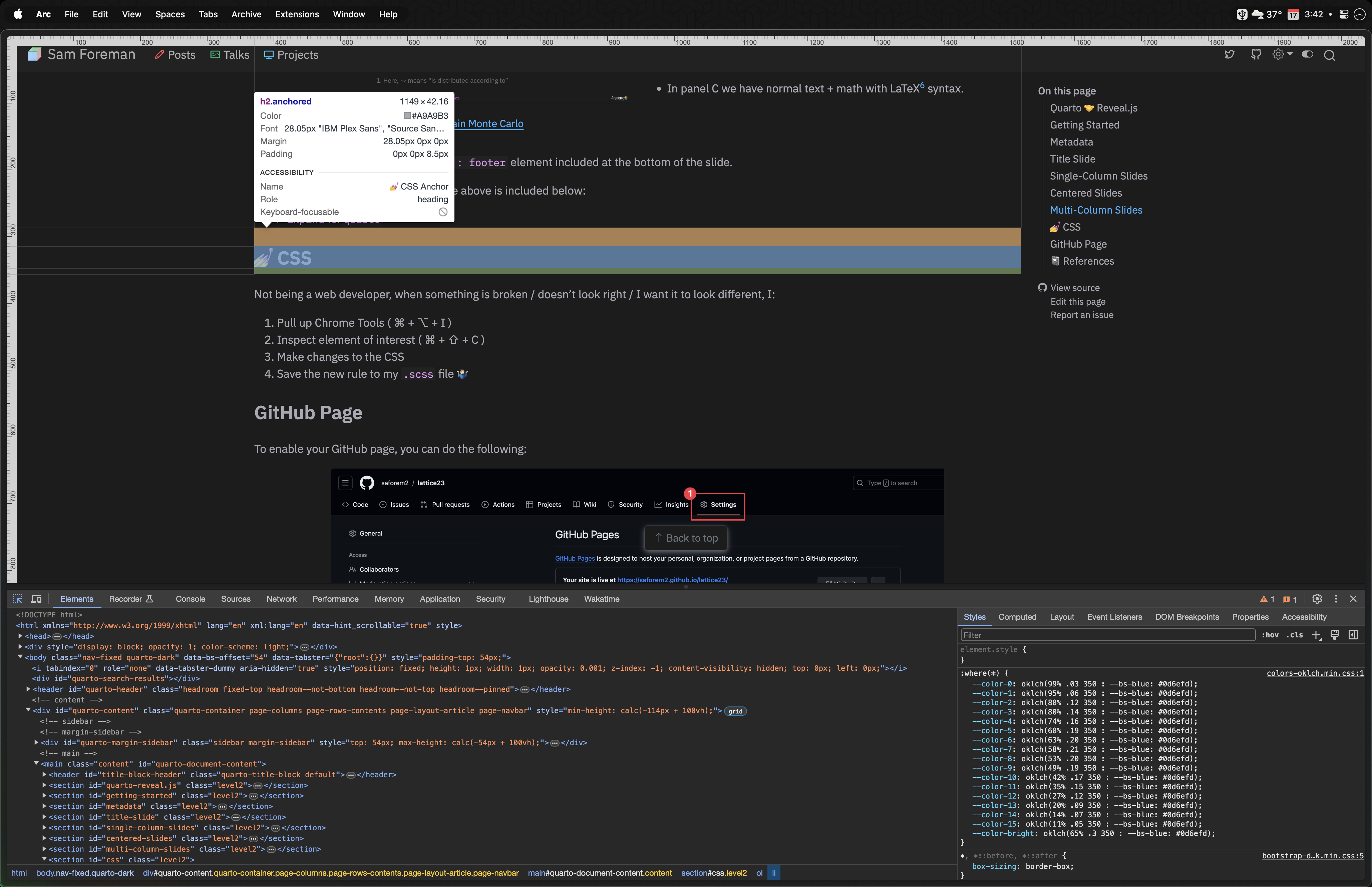
Figure 4: Example of selecting an element and making a change to the CSS.
📃 GitHub Page
To enable your GitHub page, you can do the following:
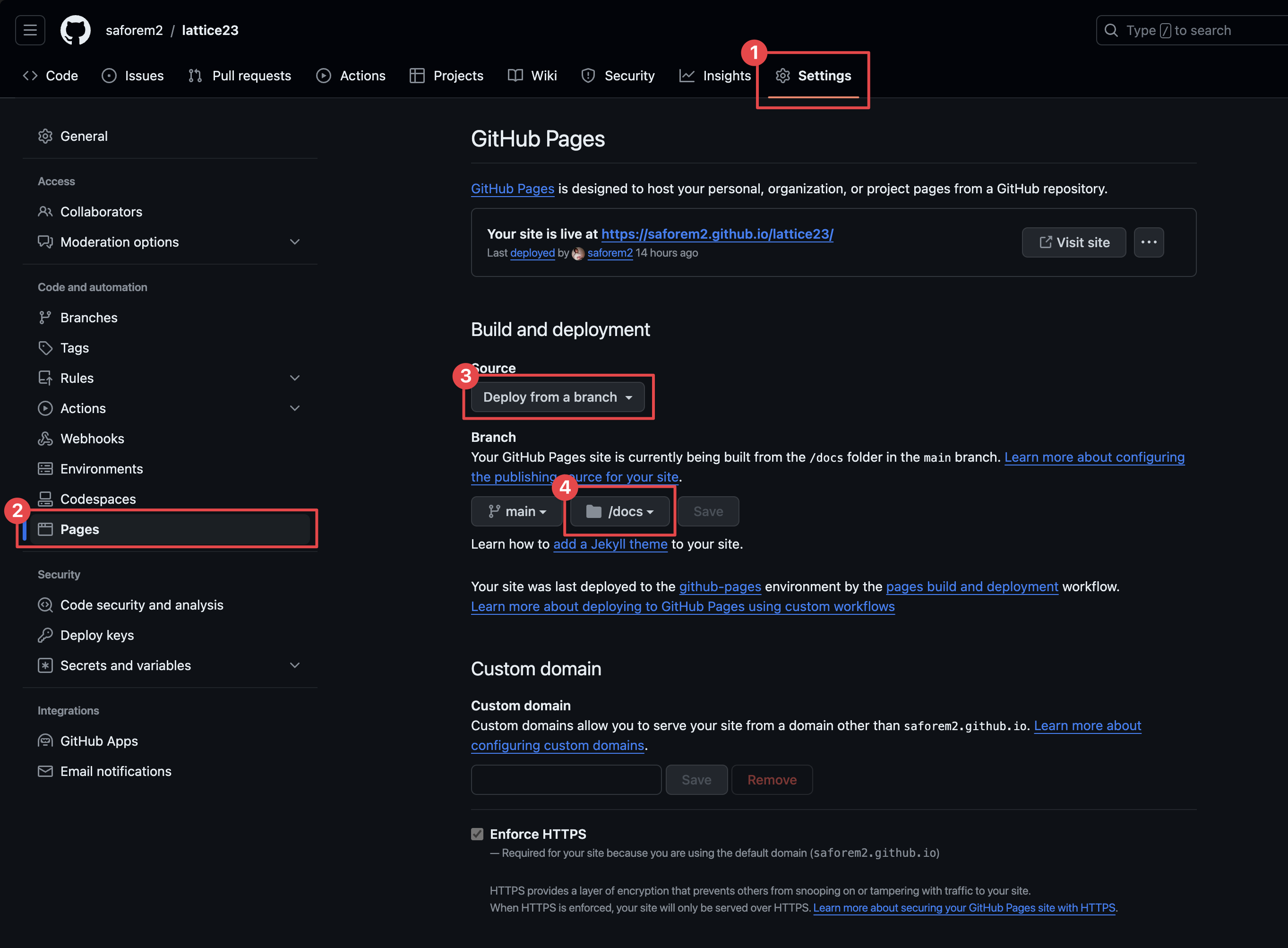
Figure 5: Instructions for building a GitHub page using the docs/
directory off the main branch.
In this case, the repo is:
and the site is published at
https://saforem2.github.io/lattice23
📓 References
- Reveal Themes
- Using Pandoc fenced divs
- Slidecraft 101: Colors and Fonts
- Beautiful Reports and Presentations with Quarto
- Quarto Clean Theme
Tip
❤️🩹 Status
Last Updated: 12/22/2025 @ 18:27:29
[^1]: And countless other people IRL

[^2]:
    One thing I’ve been meaning to do, is clean up all my `css/*`
    files and move them all to a single repository, but I’ll save that
    for another day.

[^3]: _An open-source scientific and technical publishing system_

[^4]: [Equations](https://quarto.org/docs/authoring/markdown-basics.html#equations)

[^5]:
    Quarto comes with lightbox support, so you can click on images to
    display them full screen.