🚂 Loooooooong Sequence Lengths
Optimizations for extremely long sequence lengths in Megatron-DeepSpeed as part of the DeepSpeed4Science project.
Sam Foreman 2024-02-12

Figure 1: This work was done as part of the DeepSpeed4Science project, in collaboration with Microsoft.
The new Megatron-DeepSpeed release contains a variety of improvements / optimizations to enable pre-training Transformer based architectures with significantly longer sequences than was previously possible.
📓 Note:
Additional details can be found in the 📁
DeepSpeed4Science
folder.
DeepSpeed4Science (09/2023)
New Features
-
Enabled Megatron-LM’s sequence parallel.
-
Enabled rotary positional embedding.
-
Enabled FlashAttention v1 and v2.
-
Enabled new fused kernels from NVIDIA.
New optimizations
-
Enabled attention map memory optimization, where we first generated attention mask on CPU memory and then moved it into GPU memory to avoid out-of-memory errors when training with very large sequence lengths.
-
Position embedding partitioning, where we split weights of position encoding across all GPUs when enabling sequence parallel to further reduce the memory footprint.
Initial Results
Table 1: Long sequence length support1 from
microsoft/Megatron-DeepSpeed
| Sequence Length | Old Megatron-DeepSpeed (TFLOPS) | New Megatron-DeepSpeed (TFLOPS) |
|---|---|---|
| 2k | 25 | 68 |
| 4k | 28 | 80 |
| 8k | OOM | 86 |
| 16k | OOM | 92 |
| 32k | OOM | 100 |
| 64k | OOM | 106 |
| 128k | OOM | 119 |
| 256k | OOM | 94 |
Data
gpus = ('32', '64', '128')

colors = {
    'Old Megatron-DS': '#FF5252',
    'Megatron-LM': '#76b900',
    'New Megatron-DS':  '#1A8FFF',
}

data = {
    '25B': {
        'Old Megatron-DS': np.array([36, 42, 42]),
        'Megatron-LM': np.array([26, 48, 52]),
        'New Megatron-DS': np.array([192, 448, 512]),
    },
    '33B': {
        'Old Megatron-DS': np.array([28, 32, 32]),
        'Megatron-LM': np.array([14, 46, 52]),
        'New Megatron-DS': np.array([128, 384, 448]),
    },
}
Make the plots
x = np.arange(len(gpus))
width = 0.25
multiplier = 0

outdir = Path(os.getcwd()).joinpath('assets')
outdir.mkdir(exist_ok=True, parents=True)

improvement = {}
for idx, (model_size, d) in enumerate(data.items()):
    multiplier = 0
    figure, axes = plt.subplots(figsize=(7.5, 4))
    fig = plt.gcf()
    ax = plt.gca()
    for label, value in d.items():
        offset = width * multiplier
        rects = ax.barh(
          x + offset,
          value,
          width,
          label=label,
          color=colors[label],
          alpha=0.8
        )
        ax.bar_label(
          rects,
          padding=3,
          color=colors[label],
          family='monospace',
          weight='bold'
        )
        multiplier += 1
    ax.set_ylabel(
        'GPUs',
        fontsize=18,
        family='sans-serif',
        loc='center',
    )
    ax.set_yticks(x + width, gpus)
    plt.figtext(
        0.005, 0.93, f"{model_size}", fontsize=24, fontweight='bold', ha='left'
    )
    ax.set_xlabel(
        'Sequence Length (k)', fontsize=18, loc='center'
    )
    ax.legend(
        bbox_to_anchor=(0.005, 1.04, 0.99, .098),
        alignment='center',
        edgecolor="#83838320",
        frameon=True,
        ncols=3,
        fontsize=13,
        mode="expand",
        borderaxespad=0.01
    )
    save_figure(fname=f'{model_size}', outdir=outdir)
    _ = plt.show()
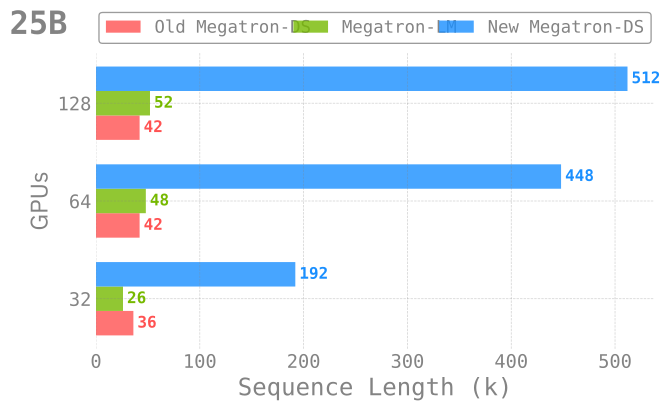
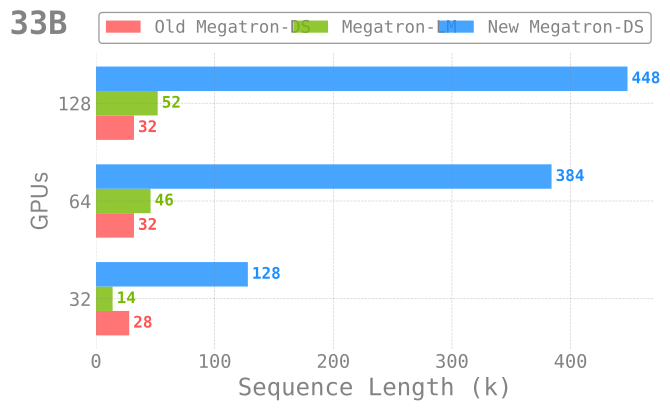
Figure 2: Pre-training with long sequence support across different model
sizes and numbers of GPUs. In each case, the new (current)
implementation significantly outperforms both NVIDIA/Megatron-LM as
well as our previous implementation.
Installation
Using install.sh
Installation
Important
To install, simply:
git clone https://github.com/ramanthanlab/GenSLM/
cd GenSLM/examples/long-sequences/
./install.sh
Explicitly,
./install.sh
will:
- Automatically create a virtual environment on top of the
latest
condamodule - Install (+ update2) / build all the required dependencies into this virtual environment
Step-by-Step
For completeness, we describe below the steps for installing and building each of the dependencies.
-
Clone GitHub repo:
git clone https://github.com/ramanthanlab/GenSLM -
Load
condamodule:-
ThetaGPU:
# ThetaGPU: if [[ "$(hostname)==theta*" ]]; then export MACHINE="ThetaGPU" export CONDA_DATE="2023-01-10" module load conda/2023-01-11 conda activate base fi -
Polaris:
# Polaris:
if [[ "$(hostname)==x3*" ]]; then
    export MACHINE="Polaris"
    export CONDA_DATE="2023-01-10"
    module load conda/2023-01-10-unstable
    conda activate base
fi
-
-
Setup Virtual Environment3:
cd ./genslm/examples/long-sequences # create a new virtual environment mkdir -p "venvs/${MACHINE}/${CONDA_DATE}" python3 -m venv "venvs/${MACHINE}/${CONDA_DATE}" --system-site-packages source "venvs/${MACHINE}/${CONDA_DATE}/bin/activate" -
Create a new folder (
genslm/examples/long-sequences/deps/${MACHINE}) where we’ll installing dependencies locally:mkdir -p "deps/${MACHINE}" cd "deps/${MACHINE}"
Dependencies
We provide below the details needed to install each of the required dependencies.
saforem2/ezpz
-
pip install -e "git+https://github.com/saforem2/ezpz.git#egg=ezpz"
Microsoft/DeepSpeed
-
git clone https://github.com/microsoft/DeepSpeed.git
cd DeepSpeed
python3 -m pip install -e .
Microsoft/Megatron-DeepSpeed
-
git clone https://github.com/microsoft/Megatron-DeepSpeed.git
NVIDIA/apex
-
git clone https://github.com/NVIDIA/apex
cd ../apex/
pip install -v --disable-pip-version-check --no-cache-dir --no-build-isolation --global-option="--cpp_ext" --global-option="--cuda_ext" -e ./
pybind/PyBind11
-
pip install pybind11
Dao-AILab/flash-attention
-
Flash Attention
- The new release supports three different implementations of
FlashAttention: (
v1.0.4,v2.x,triton) - FlashAttention
v2.xmay have numerical instability issues. For the best performance, we recommend using FlashAttention + Triton
-
v1.0.4:python3 -m pip install flash-attn==1.0.4 -
v2.x:git clone https://github.com/Dao-AILab/flash-attention cd flash-attention python3 setup.py install -
openai/triton:git clone -b legacy-backend https://github.com/openai/triton cd triton/python python3 -m pip install cmake python3 -m pip install .
- The new release supports three different implementations of
FlashAttention: (
Running
The ALCF/ directory contains shell scripts for setting up
the environment and specifying the options to be used when launching.
Various options can be specified dynamically at runtime by setting them in your environment, e.g.:
MODEL_SIZE_KEY="GPT25B" SEQ_LEN=128000 USE_FLASH_ATTN=1 MICRO_BATCH=1 GAS=1 SP_TYPE="megatron" ZERO_STAGE=1 ./ALCF/train-gpt3.shExplicitly:
ALCF/train-gpt3.sh: Main entry point for training- This script will automatically source the rest of the required
ALCF/*.shscripts below
- This script will automatically source the rest of the required
ALCF/models.sh: Contains some example model architectures for GPT3-style modelsALCF/args.sh: Logic for parsing / setting up runtime options for Megatron and DeepSpeedALCF/setup.sh: Locate and activate virtual environment to be used, ensure MPI variables are set properlyALCF/launch.sh: Identify available resources and build the command to be executed- i.e. figure out how many:
{nodes, GPUs per node, GPUs total}, to pass tompi{run,exec} - then, use this to build
mpiexec <mpiexec-args> python3 pretrain_gpt.py
- i.e. figure out how many:
ZeRO Offloading
🚀 W&B Report: Looooooooong Sequences
These newly introduced optimizations, in combination with ZeRO-Offload allows us to go even further.
By employing ZeRO-Offloading, we are able to free up additional memory which can be used for even longer sequences.
Though work is still ongoing, this is a promising direction that will allow us to consider significantly larger genomes than previously possible.
We use Weights & Biases to track these experiments, and have aggregated our initial results in the W&B Report below.
We can evaluate the performance of our model by looking at two different
metrics for throughput: samples_per_sec and TFLOPS.
Explicitly, we see that we are able to scale up to significantly longer
sequences (420k / 128k ~ 3.3x) with only a minimal impact on
throughput performance (81 / 105 ~ 77\%)4.
Table 2: Impact on TFLOPS as a function of increasing sequence length.
Table from:
throughput/TFLOPS
| Name | Sequence Length (k) | (seq_len / min_seq_len) | TFLOPS | TFLOPS (% of peak) |
|---|---|---|---|---|
| GPT25B | 420 | 3.28125 | 81.77225 | 77.867 |
| GPT25B | 400 | 3.125 | 90.62 | 86.297 |
| GPT25B | 360 | 2.8125 | 81.6325 | 77.7348 |
| GPT25B | 360 | 2.8125 | 82.6824 | 78.7346 |
| GPT25B | 192 | 1.5 | 115.8228 | 110.2927 |
| GPT25B | 128 | 1 | 106.672 | 101.5788 |
| GPT25B | 128 | 1 | 105.014 | 100.00 |
<iframe src=“https://wandb.ai/l2hmc-qcd/Megatron-DS-Benchmarking/reports/Looooooong-Sequences—Vmlldzo1MzI2NjA1” style=“border:none;height:1024px;width:100%”>
</iframe>
Figure 3: Weights & Biases Report